How to Create a Work Breakdown Structure: Bring Order to Your Project
From project goal to work package: structure, methods, a practical example and a template for your work breakdown structure.



“We have a clear goal in mind, and yet we keep losing track.”
That is how many project teams feel when deadlines are tight, tasks overlap and responsibilities become blurred. A work breakdown structure (WBS) brings order to exactly these situations: instead of listing loose to-dos, you break your project down into clear levels and work packages – easy to understand, traceable and shared by everyone. In security-sensitive projects, it also matters who sees which information and where data is stored. Collaboard gives you the right working environment for exactly that.
In this article, you will learn how a work breakdown structure is built, which methods you can use and how to create one step by step with your team. We show you practical examples, typical pitfalls and how to avoid them. If data protection and control matter to you, you will also learn how to run your work breakdown structure securely with Collaboard in a private cloud or on your own servers.
What is a work breakdown structure?
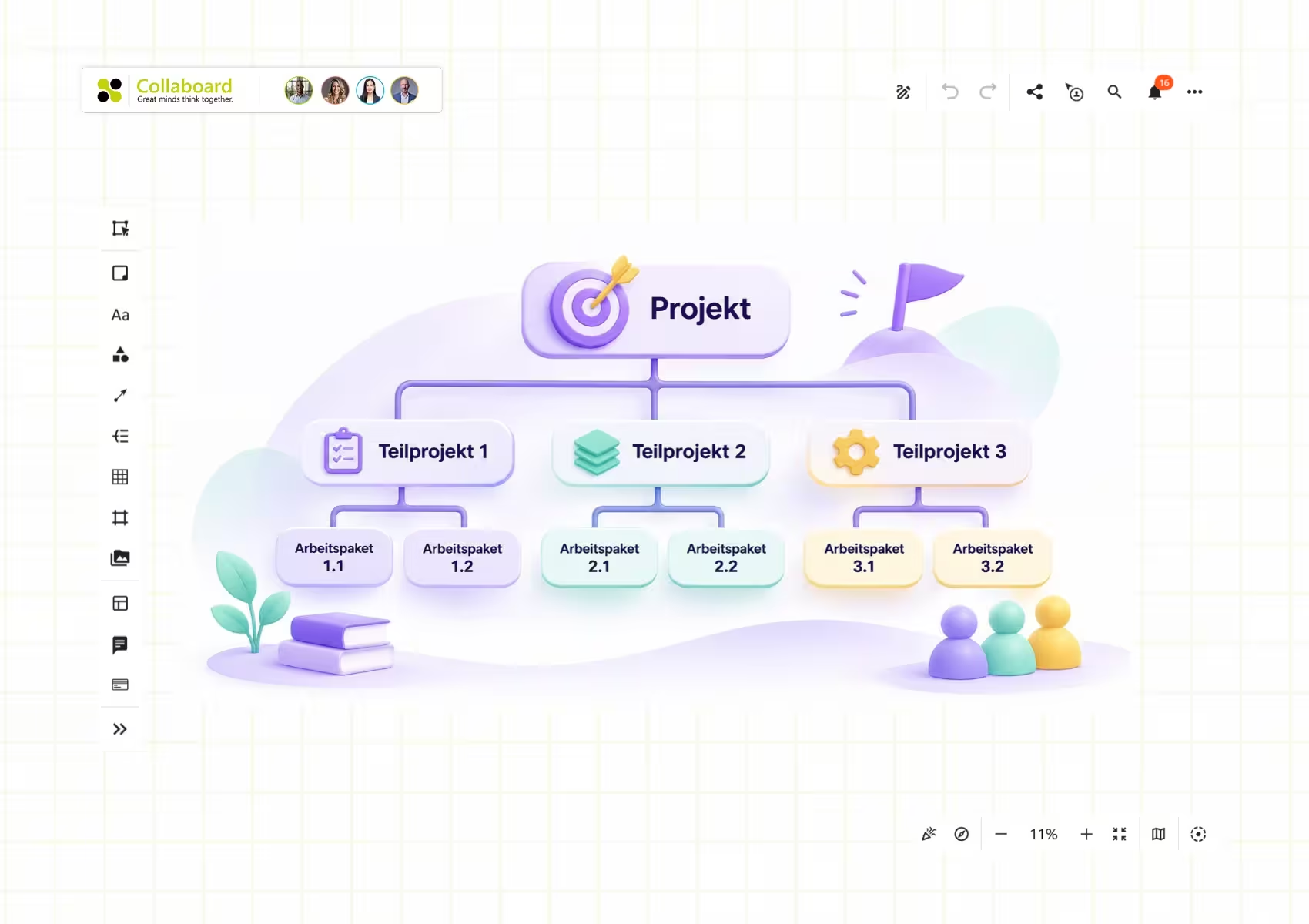
A work breakdown structure is a clear overview of all the tasks that lead you to your project goal. Instead of an endless to-do list, you break your project down into sub-tasks and smaller work packages. The result resembles a tree diagram: the overall goal sits at the top, and the individual work steps are arranged below it.
This structure makes the project easy to follow for everyone involved. You can see at a glance which sub-tasks build on each other, where risks lie and where you should plan more resources. Unlike a simple task list, a work breakdown structure helps you see complex dependencies. It is also not the same as a Gantt chart, because the WBS is not primarily based on timelines or schedules. Instead, it gives you a clear view of all relevant work steps.
When you create your work breakdown structure in an online tool like Collaboard, you can organize your sub-tasks together with your team and update them at any time. This way, you save time, reduce misalignment and immediately see which actions are still open. This is especially useful in areas where data protection and security come first. With Collaboard, you can even host your data in a private cloud or on your own server.
Structure of a work breakdown structure: levels and elements
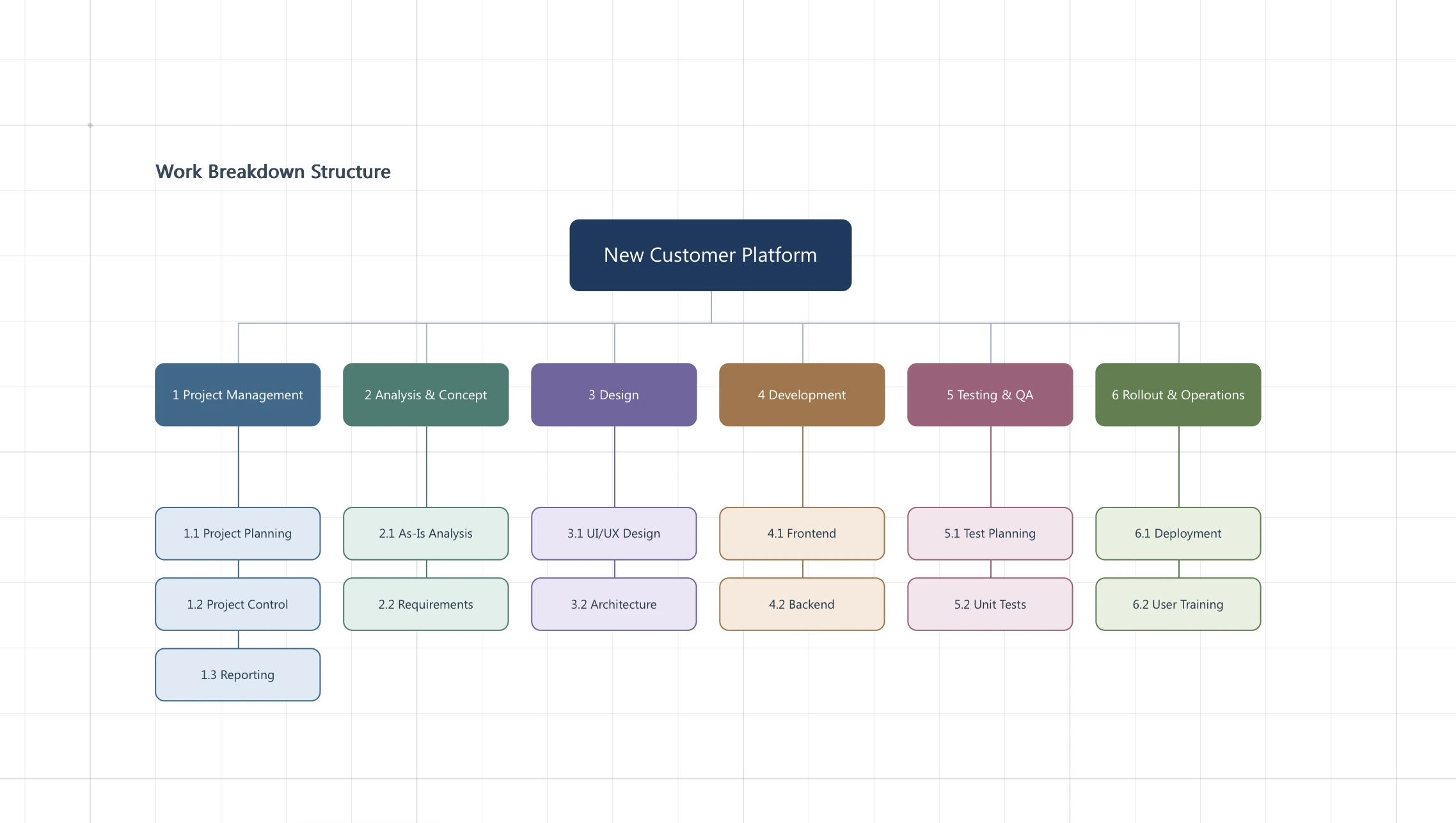
In a work breakdown structure, you divide the overall project into several levels. At the top, you note the goal: for example the new product, the planned event or the redesign of an internal platform. Below that, you split the main tasks into individual areas. These sub-tasks can in turn be broken down into work packages. Three levels are often enough, but you can add more if your project is extensive.
Many project teams use one of three approaches to structure their plan:
- Object-oriented: You organize tasks by concrete components (e.g. individual parts in a construction project).
- Function-oriented: You sort by activities (e.g. production, marketing, sales).
- Phase-oriented: You follow time-based stages (e.g. concept, implementation, closing).
Think of it as a tree: the trunk is your project goal, the large branches are the most important sub-tasks and the smaller twigs are your work packages. This helps you keep the big picture, communicate clearly in your team and reduce misunderstandings.
Methods for creating a WBS: top-down, bottom-up, yo-yo
There are three ways to create a work breakdown structure. Each follows a different principle, depending on how familiar you are with your project goal and how well you already know which work steps lie ahead.
- Top-down: You start with the main goal and break it down step by step into sub-tasks and work packages. This works well if you already have a clear overview. Once you have defined the top level, you go one level deeper until you have captured all the details.
- Bottom-up: Here, you first collect all possible tasks without a fixed order. You then group them logically and derive the overall project from them. This method suits projects where a lot is still open or where you want to gather different ideas from your team.
- Yo-yo (counter-current): This approach alternates between top-down and bottom-up steps. For example, you start at the top, work your way down to small packages and then review the overview again. This way, you refine your plan over several rounds.
How to create a work breakdown structure step by step
Before you begin, get your team on board and plan enough time for a clear structure. These steps help you keep track:
- Clarify the project goal: Write down your project name and the overall goal. Make sure everyone involved knows exactly what you are working towards.
- Define the main areas: Think about which major topics make up the project. These form the top level of your plan.
- Derive sub-tasks: Break each main area down into smaller tasks. Your team can collect ideas together here. Make sure each sub-task has a clear name.
- Refine work packages: Check whether some sub-tasks can be broken down further. Too many levels make it harder to keep track, but if a further split makes sense, go ahead and add it.
- Assign responsibilities: Assign specific people to the tasks. This increases commitment. In Collaboard, for example, you can use avatars or markers to show clearly who is responsible for what.
- Review and adjust: Read through the entire plan once more. If important points are missing or appear twice, adjust the structure.
- Make collaboration easier: Share the finished work breakdown structure with your team. If your project requires a high level of data protection, you can run Collaboard in a private cloud or on your own servers. This keeps you independent and compliant with all security standards.
If you invite your colleagues directly to the board, you can create your WBS together, live or asynchronously. If this level of security and flexibility is what you are looking for, we recommend booking a demo.
Tools, work breakdown structure template and software
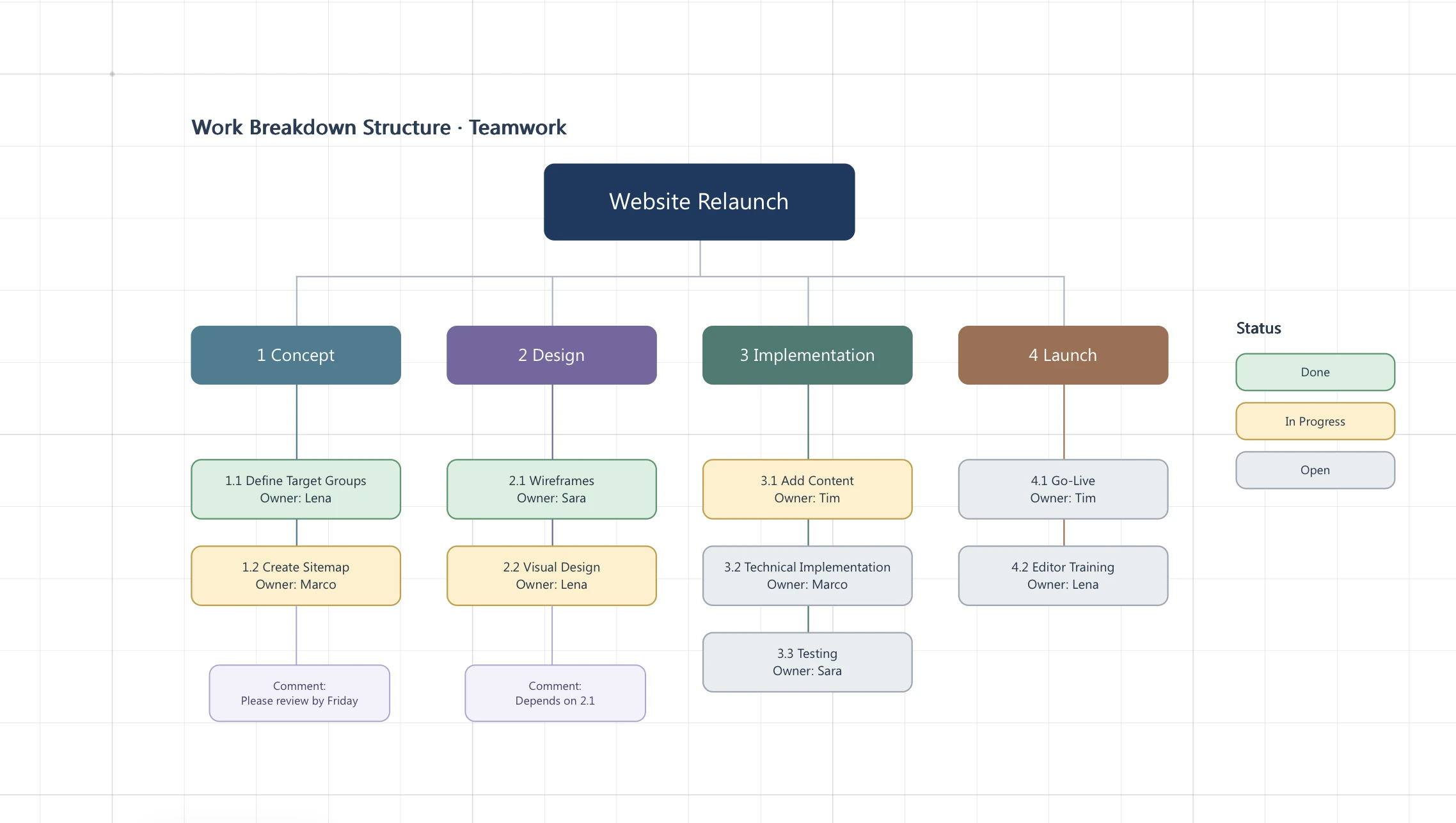
Here you will find a completed work breakdown structure template based on a software project. You can use it for free and adapt the sub-tasks, owners and time frames to your own project:
Many project teams use software such as Excel or Word for their work breakdown structure. You can build simple hierarchies with these tools, but moving individual elements is tedious and the overview often gets lost. In a spreadsheet, for example, you have to adjust every row manually, which quickly becomes confusing.
Online whiteboards and project management tools are much more practical. There, you can arrange, color-code and move tasks and sub-projects freely. This creates a visual structure that makes it easier for everyone involved to find their way around.
If you also need to meet your own security standards, a self-hosted installation is the way to go. With Collaboard, you can run the online whiteboard on your own server or in a private cloud and use a wide range of templates.
Work breakdown structure: common mistakes and how to avoid them
A work breakdown structure only works if it covers all essential tasks without being overloaded. A typical weakness is that some teams define tasks too broadly. Then nobody knows exactly who should do what. At the same time, you should not include every tiny detail, or nobody will be able to find their way through the mass of sub-tasks.
Common pitfalls
- Unclear boundaries: Several areas overlap and it remains unclear who is responsible for which work packages.
- Wrong level of detail: Too many or too few levels. One extreme makes planning imprecise, the other leads to unnecessary complexity.
- Create once, never update: Once the project picks up speed, things often change. A static plan quickly leads to misunderstandings.
To avoid this, review your plan regularly and restructure it when needed. If the project goal changes or sub-tasks are dropped, reflect this in the plan as well. Use a simple checklist or markers to make sure every work step is covered. For last-minute changes, a shared online whiteboard like Collaboard is handy, because you can update your work breakdown structure live with your team.
Conclusion: creating clarity with a work breakdown structure
A work breakdown structure is more than just an overview: it is an important tool that helps you keep track even in demanding projects. By breaking your goal down into clear levels and work packages, you make sure nobody works at cross purposes and every team member knows exactly what to do. This works even in industries with strict security requirements if you rely on a self-hosted tool like Collaboard.
If you now feel like creating your own work breakdown structure, you can get started right away. A visual approach not only helps you work in a more structured way, it also lets you spot challenges and risks early. Give it a try and see how much it improves collaboration. If you need an environment in which you can implement your plan securely, feel free to book a demo and get started with Collaboard.
On This Page

Start for free with Collaboard
Create your first online whiteboard, invite others and start collaborating visually.
You can use Collaboard for free and upgrade later whenever your needs grow.
*No credit card required
Alisia Mühlbauer
Marketing Strategist
Alisia combines a strong background in design, branding and digital marketing with a passion for clear visual communication. At Collaboard, she brings her experience in content creation, social media and brand storytelling to topics around visual collaboration, creativity and modern teamwork.


Frequently asked questions
Any questions? We are here to help.
A work breakdown structure shows you the entire project structure as a hierarchical tree, with clear relationships between the goal, sub-tasks and work packages. A task list, on the other hand, is usually linear and does not show these relationships or an overarching structure.
An object-oriented structure works well if your project delivers a concrete result (e.g. a building). For processes that run in stages over time, a phase-oriented structure makes sense, while function-oriented plans are organized by areas of activity such as purchasing or development.
Your plan should be broken down far enough that every task can be planned and controlled, while still remaining clear. As a rule of thumb: no more than 7–10 elements per level, and ideally the whole plan fits on one page.
Digital whiteboards like Collaboard give you a clear, visual overview of your tasks, including drag and drop, color coding and user assignments. At the same time, they let you meet the highest security requirements, even when hosted on your own servers.
Yes, and it has many advantages: you gain more perspectives, assign responsibilities early and reduce misunderstandings later on. With a tool like Collaboard, you can involve everyone in real time or asynchronously and develop your plan together.
A work breakdown structure is not a static document. You should update it regularly as soon as tasks change or new ones are added. In Collaboard, you can make changes directly on the whiteboard without having to create a new version first.
Yes, Collaboard can run completely offline, for example in an isolated on-premises environment. This makes it suitable for organizations with the highest data protection requirements.
Subscribe to the newsletter
Stay up to date with the latest tips and news on collaboration.
Start your next whiteboard now
Get a free trial of Collaboard with up to 3 boards and five people per session. All key features are available for you to try out.