
Structure and use a Scrum Board effectively with your team
A Scrum Board shows at a glance how a sprint is progressing and which tasks currently need attention. Many teams use it every day because columns and cards create a clear workflow and make coordination easier.


.avif)

Scrum Board – Key Takeaways
- A well-structured Scrum Board shows the progress of a sprint step by step, making it easy to see how far tasks have progressed and where delays are occurring.
- Columns and cards organize tasks clearly and help the team immediately understand which steps are coming up during the sprint.
- Scrum Boards work with fixed time periods, which distinguishes them from Kanban Boards, where work moves through a continuous process without sprint boundaries.
- In Collaboard, you can quickly create a Scrum Board and save it as a template, allowing every sprint planning session to start with the same clear structure.
How Is a Scrum Board Structured and What Is Its Purpose?
A Scrum Board visualizes the workflow of a sprint in a clear and structured way. It consists of columns that represent progress and cards that represent individual tasks. These basic Scrum principles create a transparent view of the work and help everyone involved understand the current status.
Basic board structure:
- Ready
- In Progress
- Done
Cards typically move from left to right. The further to the right a card is, the further the task has progressed. This allows you to see immediately how the sprint is going without needing additional status updates. Bottlenecks also become visible early when cards remain in the same column for too long.
The purpose of a Scrum Board:
- provide a clear overview of the current status
- create a shared understanding of the next steps
- reduce unnecessary questions within the team
- make sprint progress visible for daily coordination
What Elements Belong on an Effective Scrum Board?
An effective Scrum Board consists of several clearly defined elements. Only when columns, cards, and orientation points work together does the sprint workflow remain easy to understand and your team can see how the work is progressing at any time.
Columns form the basic structure of the board. They show how tasks move step by step through the sprint. The basic setup is intentionally simple but can be expanded whenever necessary. Cards contain the actual sprint tasks. Each card briefly describes a task and shows who is working on it. To keep cards easy to understand, they should contain only the most important information.
Important information to include on cards:
- short description
- responsible person
- notes or comments
- visible priority
In Collaboard, moderation cards or task elements work particularly well because they are easy to read and can be moved around quickly. Colors or small visual markers can provide additional orientation. A board should also include elements that represent the sprint as a whole. These help the team keep the overall context in mind and plan the workflow more effectively.
Useful orientation points:
- sprint goal in a clearly visible location
- sprint backlog containing all tasks included in the sprint
- dedicated areas for blockers or risks
Together, these elements turn the Scrum Board into a tool for organizing the entire sprint. In Collaboard, you can use frames, color highlights, or clearly separated areas to keep the board structured without making it feel overloaded.
What Is the Difference Between a Scrum Board and a Kanban Board?
Scrum and Kanban both use visual boards, but the way teams work with them is significantly different. A direct comparison makes it easier to understand which approach is better suited to your team.
Scrum Board vs. Kanban Board
Scrum uses recurring, time-boxed cycles that provide the team with a clear rhythm and structure. Because each board focuses on the current sprint, the view remains focused and manageable. Kanban, on the other hand, visualizes a continuous workflow, allowing teams to react quickly when new work arrives or priorities change.
When Should You Use a Scrum Board and When a Kanban Board?
Teams that work within fixed time frames and want to achieve a shared goal during each sprint benefit from using a Scrum Board. It helps them plan a defined set of tasks and visualize progress throughout the sprint. Kanban is better suited to continuous workflows because each task moves individually through the process and bottlenecks become visible immediately.
Collaboard supports both approaches. Because you can freely create columns and move cards between them, you can easily adapt your workflow, whether you work in sprints or follow a continuous flow. You can also create and save your own template for either approach and reuse it whenever needed.
How Can You Create a Scrum Board Online in Collaboard?
You can build your own Scrum Board in Collaboard and then save it as a custom template. This allows you to reuse the same structure without having to recreate every detail for each sprint. The following steps provide a simple way to build a clear Scrum Board that helps your team stay oriented.
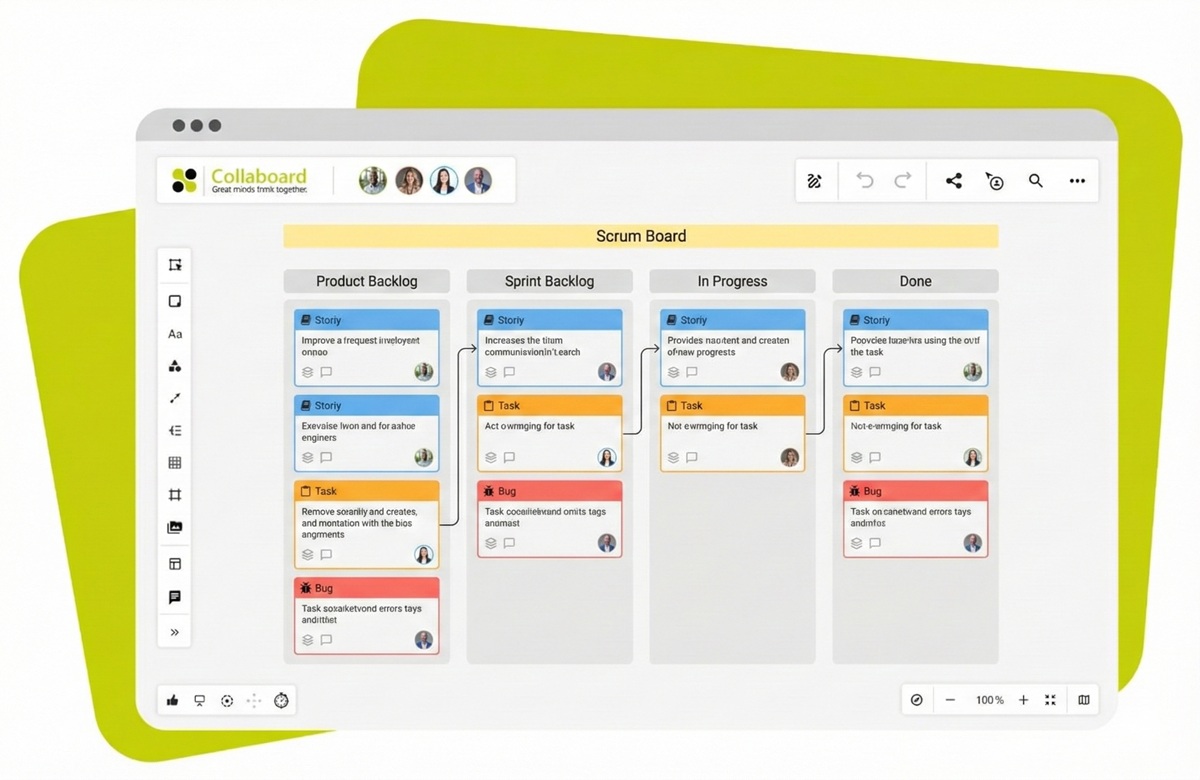
Step 1: Start With an Empty Board or Your Own Template
Create a new board and choose an area with enough space for your Scrum workflow. Because the workspace is not limited, you can expand or adjust the structure later. If you have already created a Scrum task board, you can save it as a template and reuse it for every new sprint.
- open an empty board so you can design the structure freely
- use as much board space as you need and expand it later
- save your own template once the basic structure is complete
Step 2: Create Columns and Define the Workflow
Create columns using frames or shapes and give each one a clear name. A simple structure helps your team understand the different workflow stages more quickly. If your process involves additional steps, you can add more columns without making the board unnecessarily complex.
- use frames or shapes to clearly separate columns
- use colors to highlight important areas
- add additional columns if your sprint workflow requires more stages
Step 3: Create Cards for Tasks
Create moderation cards or task elements and place them in the first column. Each card should briefly explain what needs to be done and identify the person responsible. Color coding or small symbols can provide additional orientation without making the board feel cluttered.
- add a short description to each card
- clearly assign responsibility
- use colors and symbols to highlight important information
- create an area for the sprint goal and sprint backlog at the top of the board
Step 4: Collaborate on the Board
Use comments, tasks with dates, and short notes to clarify questions directly on the board. During meetings, you can activate presentation mode so everyone sees the same view. The activity log allows you to review which changes have been made.
- use comments to provide feedback
- use presentation mode during sprint meetings
- add dates to tasks so deadlines remain clear
- use the activity log to track changes
Step 5: Save and Reuse Your Board
Save your completed Scrum Board as a template. This saves time when preparing future sprints and gives your team a consistent structure. If your workflow changes, you can update the saved template accordingly.
- save the template to simplify recurring workflows
- update the template whenever your process changes
- reuse the template across multiple teams or projects
How Are Tasks Organized on a Scrum Board?
Tasks on a Scrum Board are organized so that every card clearly shows what needs to be done, who is involved, and how far the work has progressed. To ensure that your team can understand the sprint status at any time, cards should be structured clearly and arranged in a meaningful way. In Collaboard, colors, frames, and groups help organize tasks visually without making the workflow unnecessarily complicated.
Sorting and Prioritizing Tasks
You can use colors to indicate priorities without making the Scrum Board look too busy. Tasks that belong together can be grouped within the same frame. This provides additional structure and makes bottlenecks easier to identify because affected areas stand out more clearly.
- Use color coding to highlight priorities and help the team focus on important tasks first.
- Use groups or frames for related tasks so your team can quickly understand complete work packages.
- Place high-priority tasks at the top so important work remains visible and the sprint goal stays within reach.
Identifying Bottlenecks and Managing the Workflow
When a card remains in the same column for a long time, it becomes immediately clear where work is slowing down. Collaboard makes these situations easier to identify because you can add notes or small markers directly on the large workspace. This allows you to recognize earlier where support is needed and where tasks are beginning to accumulate.
- Add markers to highlight blockers so they are not overlooked during the Daily Scrum.
- Use note areas to capture short questions so they are not forgotten.
- Clearly name each column so every card can be assigned to the correct stage and workflow steps are not duplicated.
Conclusion: Why a Scrum Board in Collaboard Creates a Clear Structure
Collaboard Scrum Board software creates clarity by bringing tasks, workflows, and goals together in one visual workspace. Cards move step by step through the workflow and show your team’s progress at any time. Colors, frames, and filters help maintain a clear overview even when several topics are being worked on in parallel.
With an infinite canvas, you can place notes, additional information, and retrospectives alongside your Agile Board without losing track of the overall picture. This creates a shared view within the online whiteboard that everyone can see, understand, and work with together.
Teams working in sprints also benefit from having Daily Scrums, planning, and retrospectives directly on the same board. Everything stays easy to navigate because each topic is located exactly where the team needs it. If you want to try creating your own Scrum Board in just a few minutes, you can get started right away.
On This Page

Start for free with Collaboard
Create your first online whiteboard, invite others and start collaborating visually.
You can use Collaboard for free and upgrade later whenever your needs grow.
*No credit card required
Michael Görög
Co-Founder Collaboard
Michael Görög is co-founder of Collaboard and is passionate about digital collaboration, visual work and the future of teamwork. He regularly shares practical insights on online whiteboards, collaboration methods, AI and new ways of turning ideas into action.

Frequently asked questions
Any questions? We are here to help.
Start with a blank board, create three columns, and add the first cards for your sprint tasks. In Collaboard, you can save this basic setup as your own template and reuse it instantly for every new sprint.
A clear basic structure consists of Ready, In Progress, and Done, as these columns make the workflow easy to understand at a glance. You can add more columns if your team needs additional steps and wants to separate them clearly.
Everyone can access the same board simultaneously and move cards in real time, making daily coordination easier. With comments, color coding, and presentation mode, your team can stay organized even when many people are working on the board at once.
The backlog sits in its own area on the board and contains all the tasks that can be selected for the sprint. Cards move from there into the first sprint column, making it easy to see which items are still waiting to be worked on.
You can adjust columns, frames, and cards directly on the board without disrupting the workflow. When goals change, simply update the board and save the revised version as a new template.
When cards remain in the same column for too long, it becomes clear where support may be needed. Markers, colors, or short notes can highlight tasks that are not progressing and should be discussed during the Daily Scrum.
Presentation mode gives you a clear view of all board content, making Daily Scrums and sprint planning easier to run. Notes, comments, and the activity log help keep decisions and changes transparent and easy to track.
Subscribe to the newsletter
Stay up to date with the latest tips and news on collaboration.
Start your next whiteboard now
Get a free trial of Collaboard with up to 3 boards and five people per session. All key features are available for you to try out.

