
Risk Assessment Matrix Template
Rate risks by how likely they are and how severe their impact would be. The risk assessment matrix shows at a glance which risks need action now and which ones you can keep an eye on.
Free to start · Swiss-made · GDPR compliant

How to use the risk assessment matrix template
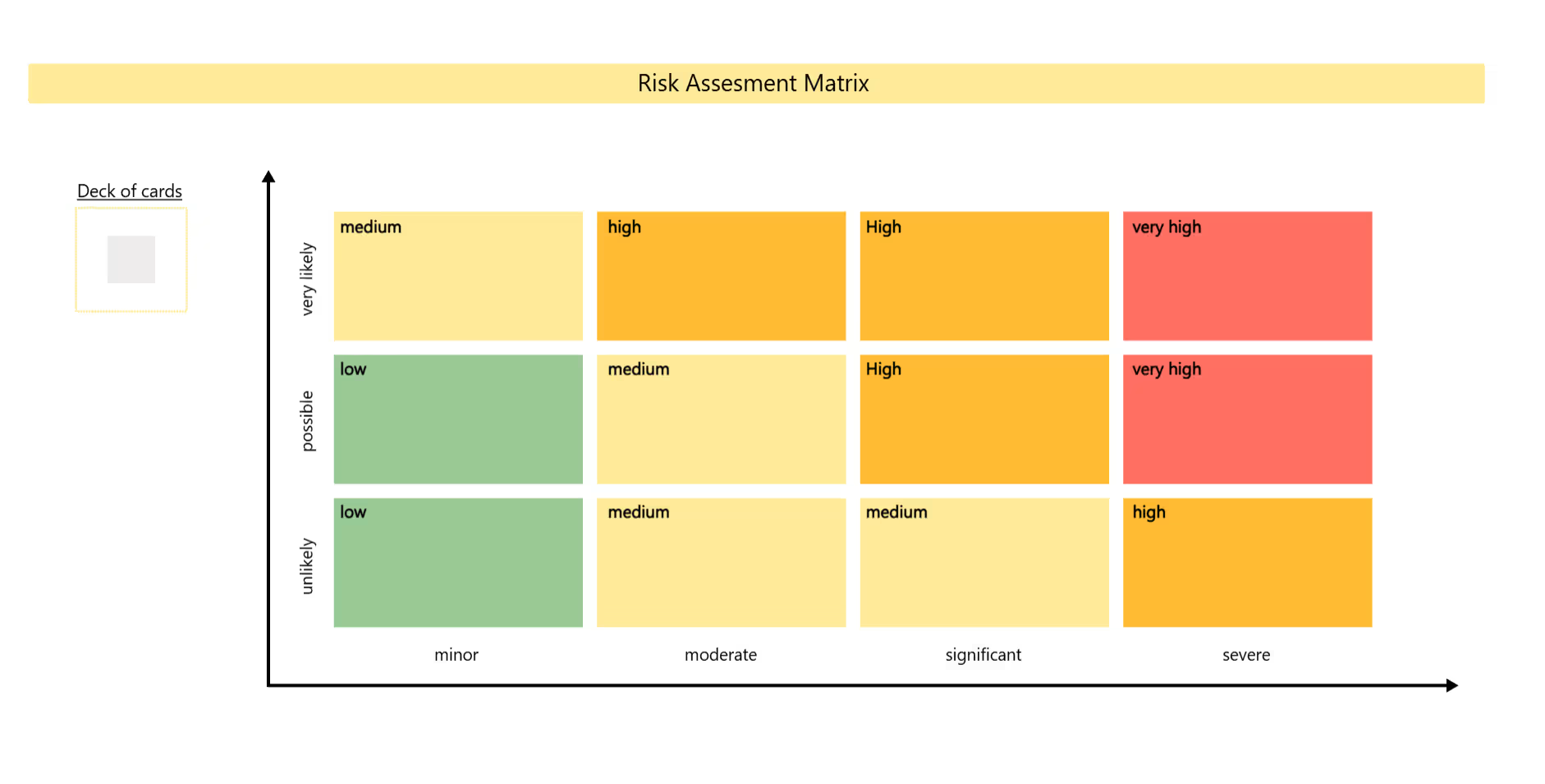
The Collaboard template shows a color-coded grid with three levels of likelihood and four levels of impact, from green for low to red for very high. A deck of neutral notes sits next to it, so each risk can be written down and placed in the matching field.
Set the scope
Agree on the project, phase or decision you're assessing risks for.
Agree on the scales
Define what minor, moderate, significant and severe mean for your project, for example in cost or delay.
Collect risks
Everyone writes risks on notes from the deck, one risk per note, before anything gets rated.
Rate and place
Discuss each risk's likelihood and impact and place the note in the matching field.
Plan measures
For high and very high risks, agree on measures that reduce likelihood or impact, and assign an owner.
Review regularly
Update the matrix at milestones or when new risks appear, and move notes as risks change.
What is a risk assessment matrix?
A risk assessment matrix, also called a risk matrix, rates risks on two axes: how likely they are to occur and how severe the impact would be. Where the two meet, a color-coded field shows the risk level, from low to very high.
The four risk levels
The examples follow one illustrative scenario: a company migrating to a new IT system.
- Low (green) Unlikely or possible risks with minor impact. Accept them and review them now and then. Example: new monitors arrive a week late.
- Medium (light yellow) Very likely risks with minor impact, possible risks with moderate impact, and unlikely risks with moderate or significant impact. Monitor them and plan simple measures. Example: some users need extra training.
- High (orange) Very likely risks with moderate or significant impact, possible risks with significant impact, and unlikely risks with severe impact. Plan concrete measures and assign an owner. Example: the data migration takes longer than planned.
- Very high (red) Possible or very likely risks with severe impact. Act now and reduce them as a priority. Example: the old system is switched off before the new one works.
If you want to prioritize tasks rather than risks, the priority matrix works with a similar grid.
When to use this template
- Project management Identify and rate risks at the start of a project.
- Change and transformation Assess what could go wrong in a larger change.
- Workplace safety Rate hazards and decide where to act first.
- Investment decisions Compare the risks of different options.
Tips for a good session
- Define the scales together Agree on what minor or severe means for your project before you start rating.
- Collect first, rate later List all risks before placing them in the matrix.
- One risk per sticky note Short, specific notes are easier to place and discuss.
- Assign owners Every high and very high risk needs someone responsible for the measures.
Why Collaboard
A Swiss-made online whiteboard for teams that care where their data lives.
Your data stays in Europe
Choose hosting in Switzerland, Germany or the EU, fully GDPR compliant. Or run Collaboard on your own servers.
Invite anyone with a link
Guests join your board for free, right in the browser. Nothing to install, no extra licenses for participants.
Made in Switzerland, with real support
Collaboard is developed in Switzerland. When you need help, you talk to people who know the product.
Frequently asked questions
Is the risk assessment matrix template free?
Yes, the risk assessment matrix template is free to use with a Collaboard account. The free plan includes up to 3 boards and five people per session.
What is a risk assessment matrix used for?
A risk assessment matrix is used to rate risks by likelihood and impact, so a team can decide which risks need action first.
Which axes does a risk assessment matrix use?
A risk assessment matrix uses likelihood on one axis and impact on the other. The Collaboard template uses three levels of likelihood and four levels of impact.
What should I do with very high risks in the risk assessment matrix?
Risks in the very high area of a risk assessment matrix need immediate attention. Define measures to reduce their likelihood or impact and assign a clear owner.
How often should a risk assessment matrix be updated?
A risk assessment matrix should be updated regularly, for example at project milestones or whenever new risks appear.
Start your next whiteboard now
Get a free trial of Collaboard with up to 3 boards and five people per session. All key features are available for you to try out.

