
How to Turn a Meeting Transcript into a Visual Customer Journey with AI and an Online Whiteboard


.png)

A 60-minute stakeholder meeting can now become a presentation-ready customer journey map in minutes.
Customer journey mapping is one of the most valuable exercises for improving customer experience, sales processes, onboarding, customer success, and upsell potential. But creating the map itself often takes too much time.
Teams discuss the journey in a workshop. They collect input from sales, marketing, customer success, support, and management. They identify touchpoints, gaps, handovers, assets, and improvement ideas.
Then someone has to turn all of this into a visual structure.
This is where the work usually slows down.
The customer journey is rarely simple. It often includes many stages, responsibilities, systems, follow-ups, decision points, handovers, and assets. It usually does not fit neatly into one slide.
That is why the combination of an online whiteboard and AI is so powerful.
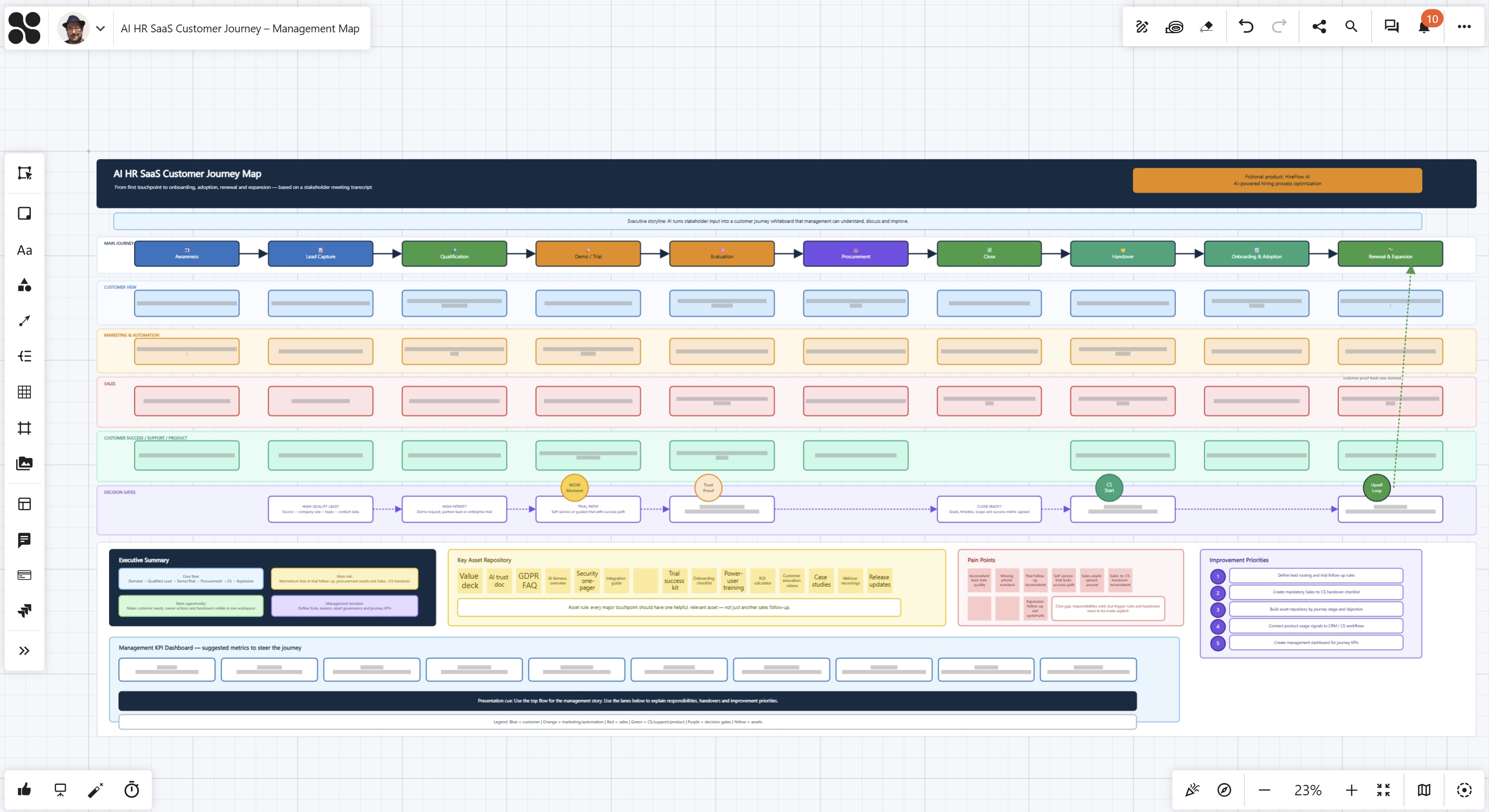
Instead of building the customer journey map manually from scratch, teams can start with a structured meeting, create a transcript, and let AI transform the discussion into a visual whiteboard. The result is not just a static diagram. It is an editable, collaborative workspace that can be reviewed, refined, linked, presented, and improved over time.
This makes customer journey mapping faster, more inclusive, and much more practical.
What is a customer journey map?
A customer journey map visualizes the steps a person or organization goes through when interacting with a company, product, or service. It usually includes stages such as awareness, lead generation, qualification, sales, onboarding, usage, customer success, renewal, and expansion.
A good customer journey map shows more than process steps. It makes visible:
- who is involved
- which touchpoints matter
- what the customer needs
- what the company does next
- where handovers happen
- which assets support the journey
- where friction appears
- what should be improved
This is why customer journey maps are so useful. They help teams move from assumptions to a shared understanding.
Why customer journeys are difficult to create manually
Many teams begin customer journey mapping in workshops, interviews, or internal meetings. This is the right approach because a customer journey should not be created by one person alone. It needs input from the people who are closest to the customer.
The challenge usually starts after the meeting.
Someone has to turn ideas, comments, pain points, touchpoints, and improvement suggestions into a clear visual structure. This often takes hours or even days. The person creating the map needs to interpret the discussion, organize the information, create a logical flow, design the visual layout, and prepare everything for the next meeting.
And because customer journeys are complex, traditional formats quickly reach their limits.
A slide is often too small for the full picture. A document is too linear. A spreadsheet is too rigid. A process diagram can become too technical.
An online whiteboard gives teams the space to show the complete journey while keeping it easy to understand. You can zoom out to see the whole flow and zoom in to explore details. You can move elements, add comments, attach links, visualize handovers, and build a map that works both as a presentation and as a working document.
Example: Mapping the customer journey of a SaaS company
Imagine a SaaS company wants to understand and improve the journey from first website visit to paying customer and later expansion.
The journey may start with a LinkedIn post, a webinar, a whitepaper, an event, or a free trial registration. After that, marketing automation sends follow-up emails, sales qualifies the lead, a demo is scheduled, and the customer starts a trial.
But the journey does not stop there.
After the purchase, customer success takes over onboarding. Key users need training. The customer may need support materials, best-practice sessions, or help with internal adoption. Later, the account team may identify expansion potential, such as additional users, services, integrations, or training packages.
In one meeting, the team can discuss all of this:
What works well?
Where do leads get stuck?
Which handovers are unclear?
Which assets are missing?
Where should sales act faster?
Where can customer success create more value?
With a meeting transcript and AI, this discussion can quickly become a visual customer journey map on an online whiteboard. The team can then refine the result, add links to relevant assets, adjust responsibilities, and prepare a management-ready overview.
This is much faster than starting with a blank canvas.
How to create a customer journey map from a meeting transcript
The quality of an AI-generated customer journey map depends on the quality of the input. That is why the process should start with a structured stakeholder meeting.
Bring together the people who understand different parts of the customer journey: marketing, sales, customer success, support, and management. Each team sees the journey from a different perspective. Marketing understands lead sources and campaigns. Sales knows how leads are qualified and converted. Customer Success sees what happens after the deal is closed. Support hears recurring questions and friction points. Management brings strategic goals and priorities.
The goal of the meeting is not to create a perfect journey map immediately. The goal is to collect the knowledge that is usually spread across different teams.
A simple question framework helps keep the discussion focused:
- Where does the journey start? Lead sources, campaigns, registrations, trials, events, referrals, or partner channels.
- What happens next? Qualification steps, follow-ups, responsibilities, automation, and sales actions.
- Where are the key touchpoints? Webinars, demos, emails, calls, onboarding sessions, support interactions, and success meetings.
- Where does the journey get stuck? Missing information, unclear ownership, weak handovers, low engagement, or process gaps.
- What helps the customer move forward? Useful assets, recordings, guides, case studies, training offers, product updates, or stakeholder communication.
- What should be improved? Better timing, clearer responsibilities, stronger assets, automation, reporting, or customer success activities.
The transcript of this meeting becomes the raw material for AI. It does not need to be perfectly written. It can include open questions, different opinions, rough ideas, and comments from multiple stakeholders. This context is useful because AI can identify patterns, group topics, and structure the information into a clear visual model.
Once the transcript is available, AI can be asked to create a first version of the customer journey map on an online whiteboard. A useful prompt could be:
“Analyze this meeting transcript and create a visual customer journey map. Identify the main stages, touchpoints, responsibilities, decision points, internal actions, handovers, assets, pain points, and improvement opportunities. Structure the result as a presentation-ready online whiteboard with clear sections, colors, labels, and enough space for later edits.”
The AI-generated board should be treated as a structured first draft. It gives the team a strong starting point, but it should still be reviewed and refined. On the whiteboard, stakeholders can adjust text, move touchpoints, add missing steps, connect related elements, link important assets, and optimize the flow before presenting it to management.
This is where the online whiteboard becomes essential. It is not just a place to display the journey. It becomes the workspace where the customer journey is discussed, improved, and prepared for decision-making.
Why an online whiteboard and AI are the perfect combination
Customer journeys are often too complex for a single slide. They include customer touchpoints, internal actions, sales follow-ups, onboarding steps, handovers, assets, KPIs, and improvement ideas.
On a slide, this quickly becomes either overcrowded or too simplified.
An online whiteboard gives teams the space to show the full journey without losing clarity. You can present the high-level flow, zoom into details, add links to relevant assets, move elements around, and refine the process together with stakeholders.
AI adds speed to this process. It can turn a meeting transcript into a structured first version of the customer journey by identifying stages, touchpoints, responsibilities, handovers, pain points, and improvement opportunities.
The team can then review and improve the AI-generated board directly on the whiteboard.
A strong customer journey whiteboard can include:
- a high-level journey overview
- key customer touchpoints
- owner lanes for marketing, sales, and customer success
- decision points and handovers
- important assets and follow-up materials
- pain points and improvement ideas
- a management summary with KPIs and next steps
This creates a practical workspace that is both presentation-ready and easy to improve.
The result: faster, clearer, and more collaborative
Using AI and an online whiteboard for customer journey mapping can significantly reduce the time between stakeholder discussion and visual output.
A process that would normally require hours of manual structuring can become a much faster workflow:
Meeting → Transcript → AI-generated whiteboard → Team refinement → Management presentation
The result is a customer journey map that is visual, editable, collaborative, presentation-ready, easier to understand, and easier to improve.
This is especially valuable when teams want to align across departments. Instead of discussing the customer journey only in abstract terms, everyone can see the process, identify gaps, and agree on what should happen next.
The biggest benefit is not only speed. It is shared understanding.
When the customer journey is visible, teams can discuss it more effectively. They can see where responsibilities are unclear, where handovers need improvement, which touchpoints are missing, and which assets can help customers move forward.
Best practices for creating customer journey maps with AI
To get the best results, teams should follow a few simple principles.
Start with clear questions before the meeting. AI performs better when the transcript contains structured input.
Include multiple perspectives. A customer journey should not only reflect the view of one department. It should include marketing, sales, customer success, support, and management where relevant.
Ask what works and what does not. A useful journey map should show strengths as well as friction points.
Capture assets and systems. Document which tools, automations, emails, documents, webinars, and other materials support each stage of the journey.
Use the AI result as a draft. The first version should accelerate the work, not replace human validation.
Refine directly on the whiteboard. Move elements, adjust flows, add links, and clarify responsibilities visually.
Keep the management view clean. A good whiteboard can contain operational detail, but the main presentation flow should remain easy to understand.
How Collaboard supports this workflow
Collaboard is an online whiteboard built for visual collaboration. It gives teams the space to map complex processes, work together in real time, and turn ideas into structured visual workspaces.
This is especially useful for customer journey mapping because the journey is often too broad for a slide and too visual for a document. In Collaboard, teams can create journey maps, add notes, structure touchpoints, connect elements, attach links, prepare management views, and continue improving the board over time.
With the Collaboard MCP Server, this workflow can be connected directly with AI tools such as ChatGPT, Claude, Mistral, and other MCP-compatible assistants. This also opens the door for organizations that want to work with self-hosted or privately operated AI tools, depending on their setup.
That means meeting transcripts, workshop results, or interview notes can be transformed into editable whiteboards much faster. AI can create the first visual structure, while the team reviews, refines, and prepares the result for presentation.
To learn more about this AI workflow, read our article about the Collaboard MCP Server.
The online whiteboard becomes the central place where strategy, process, collaboration, AI, and presentation come together.
Conclusion: AI does not replace customer journey work. It makes it faster.
Customer journey mapping is still a human process. It requires discussion, experience, and alignment between teams.
But AI can dramatically speed up the transformation from conversation to visualization.
Instead of starting with a blank canvas, teams can start with a meeting transcript and generate a first version of the customer journey map automatically. Then they can use the online whiteboard to refine the journey, add missing details, link assets, improve flows, and prepare the result for management.
This creates a new way of working:
Less time spent building the board manually.
More time spent improving the customer experience.
For teams that want to understand and optimize their customer journey, the combination of AI and an online whiteboard is a powerful step forward.
On This Page

Start for free with Collaboard
Create your first online whiteboard, invite others and start collaborating visually.
You can use Collaboard for free and upgrade later whenever your needs grow.
*No credit card required
Michael Görög
Co-Founder Collaboard
Michael Görög is co-founder of Collaboard and is passionate about digital collaboration, visual work and the future of teamwork. He regularly shares practical insights on online whiteboards, collaboration methods, AI and new ways of turning ideas into action.

.jpg)
Frequently asked questions
Any questions? We are here to help.
The easiest way is to run a structured stakeholder meeting, record or transcribe the discussion, and ask AI to transform the transcript into a visual customer journey map on an online whiteboard. The team can then review and refine the result collaboratively.
An online whiteboard provides enough space for complex journeys. Unlike slides, it allows teams to show the full process, add details, move elements, link assets, and collaborate in real time.
Customer journeys often include many layers, such as touchpoints, responsibilities, handovers, assets, KPIs, and improvement ideas. A slide usually forces teams to oversimplify the journey or make it too crowded. An online whiteboard provides more space and flexibility.
AI can create a strong first version by extracting stages, touchpoints, owners, pain points, and improvement ideas from a transcript. However, the result should be reviewed by the team to ensure accuracy and relevance.
A customer journey map should include journey stages, customer touchpoints, internal actions, responsibilities, decision points, pain points, assets, handovers, KPIs, and improvement opportunities.
AI reduces the manual effort needed to structure notes, summarize discussions, identify themes, and create a visual first draft. This allows teams to focus on improving the process instead of building the map from scratch.
Collaboard provides the visual workspace where AI-generated journey maps can be reviewed, edited, expanded, linked, and presented. It combines the flexibility of an online whiteboard with the speed of AI-supported content creation.
Subscribe to the newsletter
Stay up to date with the latest tips and news on collaboration.
Start your next whiteboard now
Get a free trial of Collaboard with up to 3 boards and five people per session. All key features are available for you to try out.

