
The Collaboard MCP Server: How AI Is Transforming Visual Collaboration


.png)

From Prompt to Whiteboard: The Next Evolution of Digital Collaboration
For years, online whiteboards have helped teams brainstorm ideas, plan projects, facilitate workshops, and collaborate visually.
Creating a whiteboard, however, still required users to manually add sticky notes, draw diagrams, create frameworks, organize content, and structure information.
That is now changing.
With the introduction of the Collaboard MCP Server, we are entering a new era where AI can not only assist with collaboration but actively create, analyze, and transform visual workspaces.
Imagine describing a workshop outcome, uploading a meeting transcript, or sharing a picture of your favorite canvas template - and within seconds, an AI generates a fully structured whiteboard ready for your team.
This is the future of visual collaboration. This is the future of AI-powered whiteboards
What Is an MCP Server?
MCP stands for Model Context Protocol.
It is an emerging standard that allows AI assistants such as ChatGPT, Claude, Gemini, and self-hosted Large Language Models (LLMs) to interact directly with external systems and applications.
Instead of simply generating text, AI can use MCP servers to:
- Read information from external systems
- Create content in applications
- Analyze data
- Execute actions
- Automate workflows
Think of an MCP server as a bridge between AI and software applications.
Without MCP, an AI can only talk about a whiteboard.
With MCP, it can actually create and analyze one.
What Is the Collaboard MCP Server?
The Collaboard MCP Server enables AI assistants to interact directly with Collaboard boards.
An AI can:
- Create new whiteboards
- Add sticky notes
- Build frameworks and templates
- Generate diagrams
- Draw visual elements
- Analyze existing boards
- Search content across boards
- Create structured workshop results
- Generate visual project documentation
Instead of manually building a board, users can describe what they need and let AI create the first version.
The result is not just text.
It is a working visual workspace that teams can immediately use and continue developing.
Why This Changes the Way Teams Work
Traditionally, creating a workshop board requires several manual steps:
- Create a board
- Add sections or use a template
- Build a framework
- Add sticky notes
- Organize content
- Visualize relationships
- Prepare the board for collaboration
With AI and the Collaboard MCP Server, many of these steps can happen automatically.
Users can focus on ideas and outcomes rather than board preparation.
The conversation shifts from:
"Where do I click to create a sticky note"
to:
"How do I prompt the AI to generate the best workshop board"
This is a fundamental change in how visual collaboration tools are used.
Use Cases for the Collaboard MCP Server
The true power of the Collaboard MCP Server becomes visible when AI moves beyond answering questions and starts creating visual workspaces. From workshop facilitation and project planning to product discovery and business strategy, AI can help teams generate, structure, and analyze information directly on a whiteboard.
The following examples demonstrate how organizations can use AI-powered whiteboards to reduce preparation time, accelerate collaboration, and turn ideas into actionable results.
Turn Meeting Transcripts into Visual Boards
After workshops and meetings, facilitators often spend hours reviewing notes, organizing ideas, and preparing documentation. Valuable insights can easily get lost in lengthy transcripts and static meeting summaries.
With the Collaboard MCP Server, simply upload meeting notes, call transcripts, workshop recordings, or AI-generated meeting summaries.
The AI can automatically:
- Extract action items
- Identify decisions
- Group discussion topics
- Create visual clusters
- Generate timelines
- Build Kanban boards
- Create follow-up workspaces
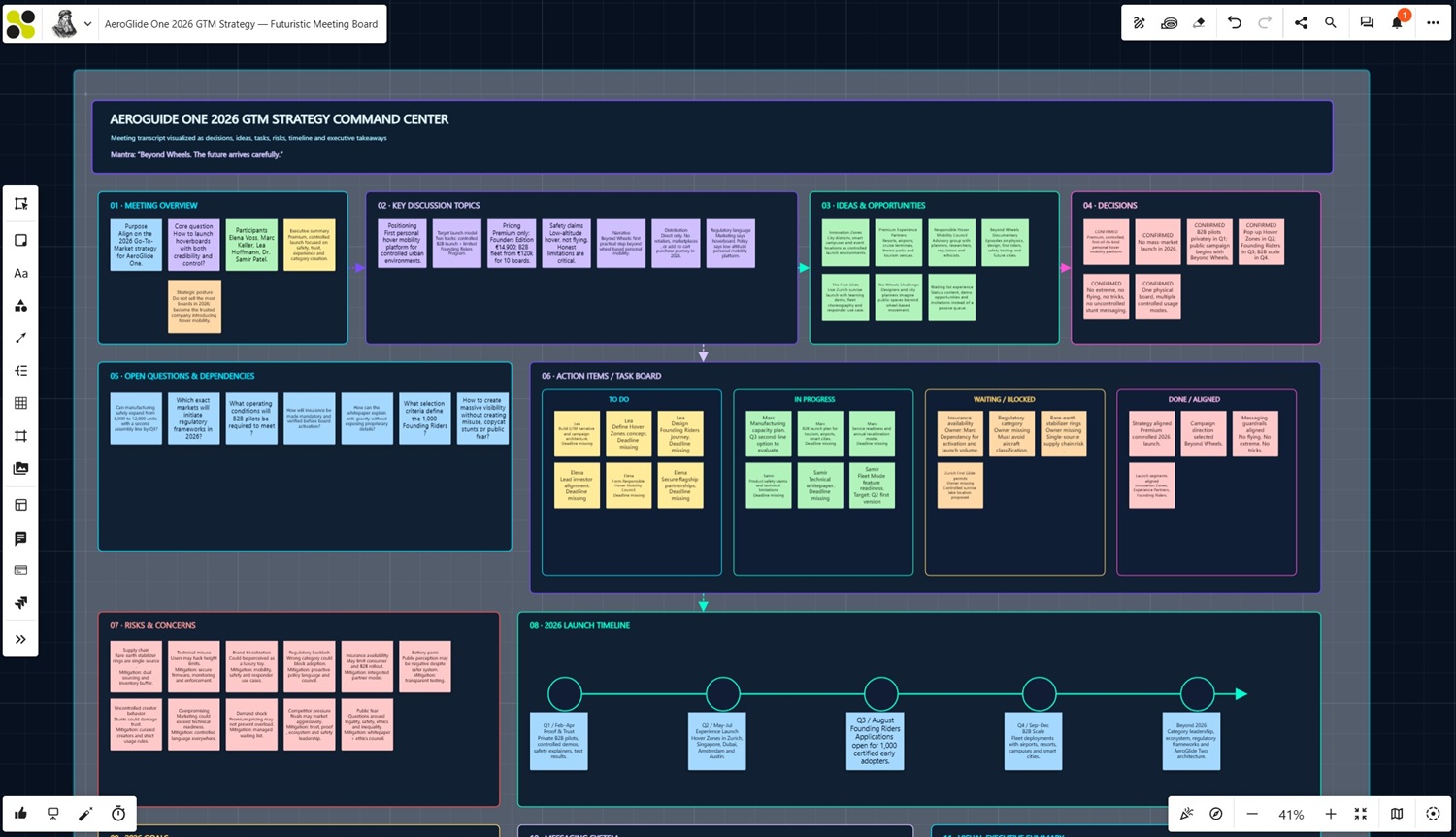
Instead of receiving a static meeting protocol, your team receives a living visual workspace that can immediately be used for follow-up activities, project planning, and collaboration. This helps teams move faster from discussion to execution while ensuring that important decisions and action items remain visible and actionable.
This Collaboard project shows how a meeting transcript can be transformed into a structured visual workspace with summaries, ideas, decisions, tasks, risks, timelines, and next steps:
Generate SWOT Analyses Automatically
Creating a SWOT analysis often requires gathering information, building a framework, and manually organizing ideas before meaningful discussions can begin.
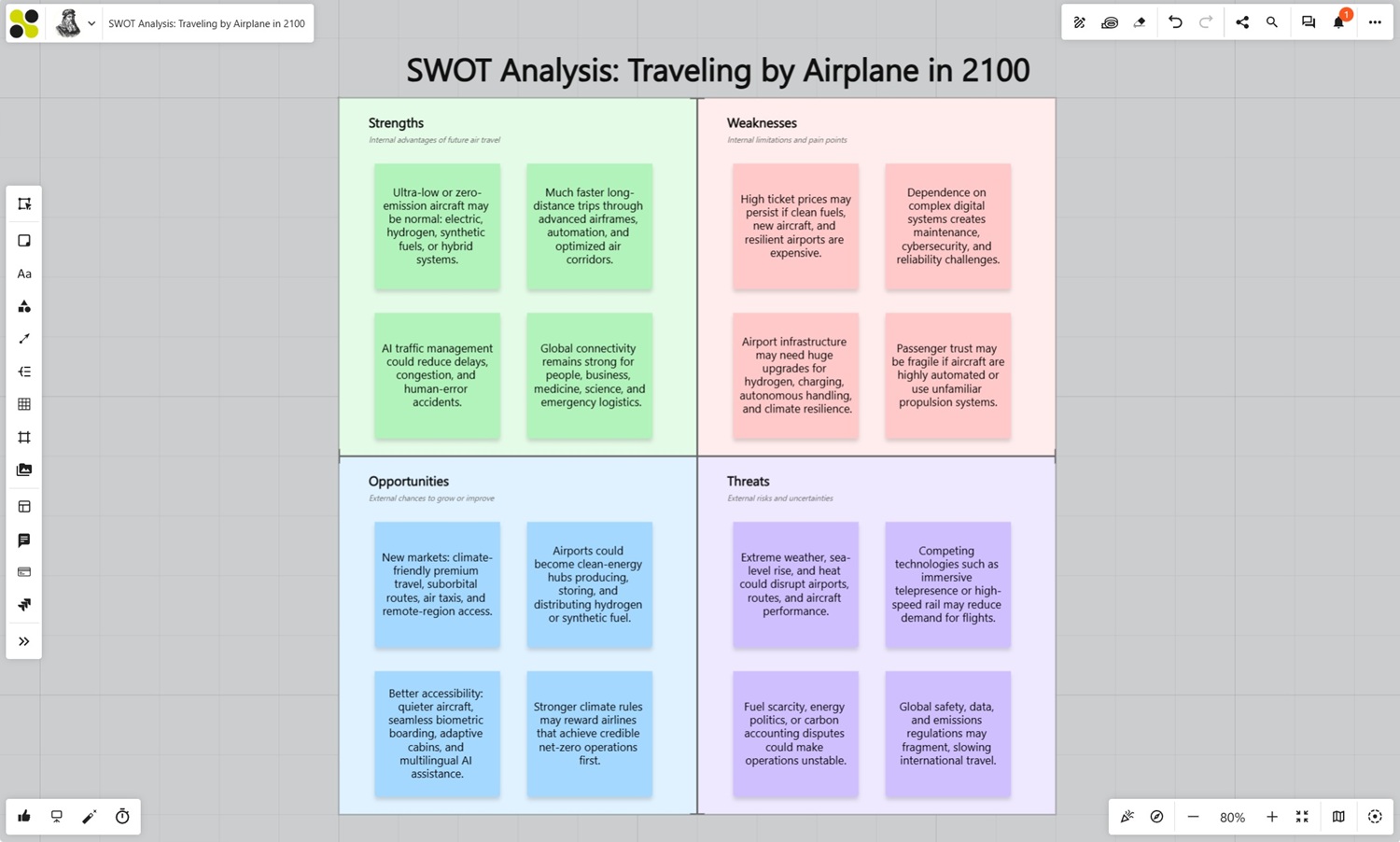
With the Collaboard MCP Server, simply describe your business, product, market, or project. The AI automatically generates a structured SWOT analysis, including strengths, weaknesses, opportunities, and threats, organized within a complete visual framework in Collaboard.
Whether you are evaluating a new market opportunity, preparing a product launch, or developing a business strategy, the generated board provides an immediate starting point for workshops, strategic planning sessions, and stakeholder discussions.
Create Business Model Canvases
Building a Business Model Canvas from scratch can be time-consuming, especially during the early stages of product development or business planning.
The Collaboard MCP Server can generate complete Business Model Canvases within seconds. Simply describe your business idea, product concept, or target market. The AI can automatically populate customer segments, value propositions, channels, customer relationships, revenue streams, key resources, key activities, partnerships, and cost structures.
Entrepreneurs, innovation teams, and product managers can quickly transform ideas into structured business concepts and focus on refining strategies instead of creating frameworks manually.
Recreate Existing Templates from Images
Have a favorite workshop template, canvas, or framework that you would like to use in Collaboard?
Simply upload a screenshot, photo, scanned document, or image of the template. The AI analyzes the structure and recreates it directly in Collaboard, including sections, layouts, and visual elements.
This works particularly well for retrospectives, journey maps, strategic planning boards, workshop canvases, team alignment frameworks, and many other visual collaboration formats. What previously required manual recreation can now be completed in seconds, saving facilitators and workshop designers valuable preparation time.
Build Product Roadmaps
Creating product roadmaps often requires significant effort to structure initiatives, milestones, and strategic goals before discussions can begin.
The Collaboard MCP Server can automatically generate visual roadmap boards containing product vision, strategic initiatives, quarterly objectives, milestones, dependencies, and deliverables. Product managers can provide a simple prompt describing their product, target audience, and goals, and the AI creates a structured roadmap ready for collaboration.
This enables teams to spend less time preparing planning boards and more time discussing priorities, dependencies, and execution.
Create Wireframes and UX Concepts
Transform ideas into visual concepts without starting from a blank canvas.
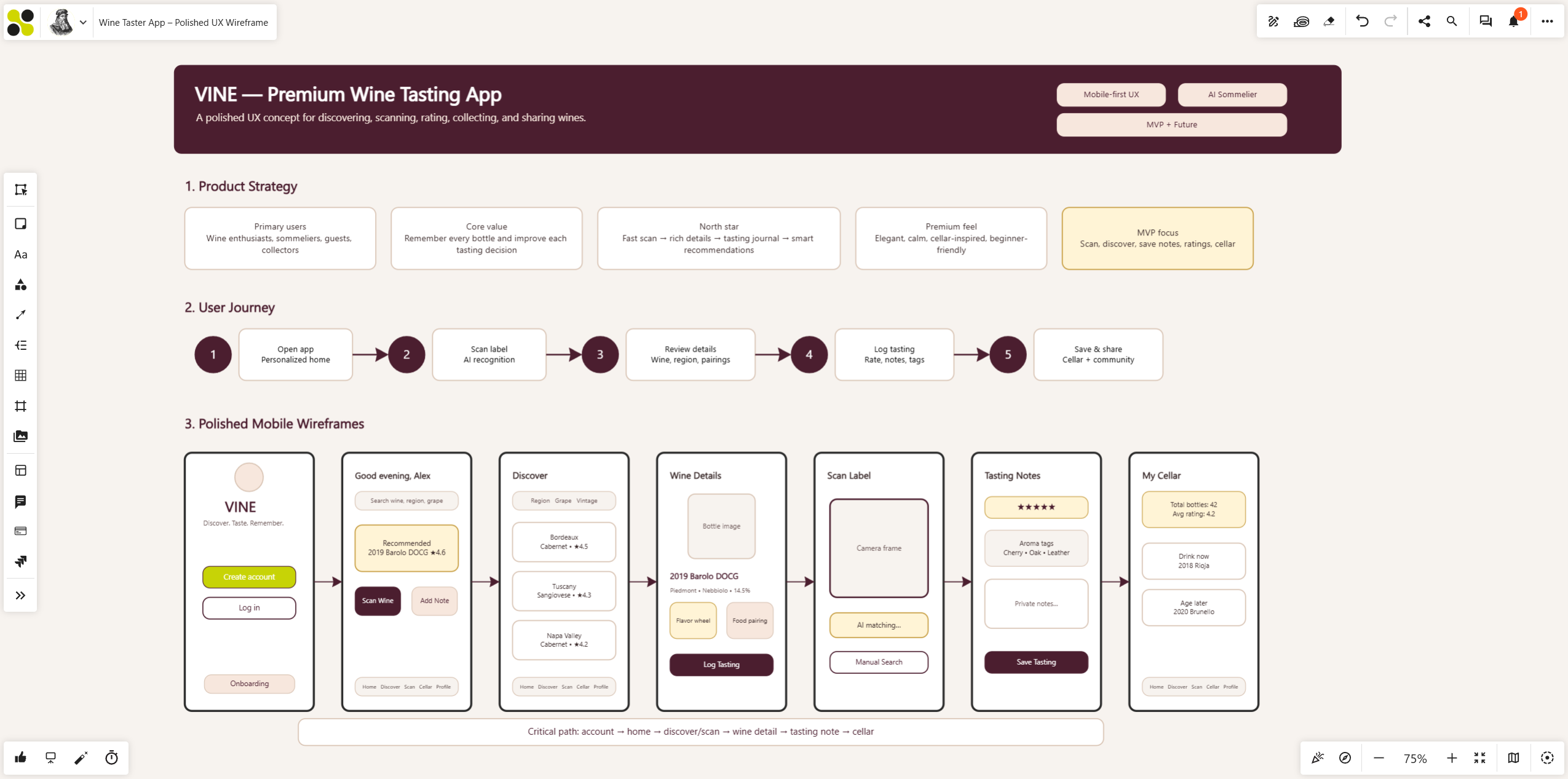
The Collaboard MCP Server can generate wireframes and UX concepts for websites, mobile applications, SaaS products, customer portals, and internal business applications. Simply describe the application, its users, and the desired functionality.
The AI can create page layouts, navigation structures, user flows, dashboards, forms, and interface concepts directly on the whiteboard. Product teams, UX designers, and stakeholders can quickly explore ideas, gather feedback, and iterate on concepts long before development begins.
Analyze Existing Whiteboards
The Collaboard MCP Server is not only about creating content.
It can also analyze existing boards.
Examples include:
- Summarizing workshop outcomes
- Identifying recurring themes
- Detecting risks
- Extracting action items
- Generating executive summaries
- Finding decisions and commitments
Large boards containing hundreds of sticky notes can be processed within seconds.
Bringing AI and Whiteboards Together in Secure Environments
Many organizations cannot use public AI services due to security, privacy, or compliance requirements.
The Collaboard MCP Server is designed to work beyond public AI platforms.
Organizations can combine:
- Self-hosted Collaboard
- Private cloud deployments
- On-premises environments
- Private AI models
- Sovereign AI infrastructures
This enables highly secure AI-powered visual collaboration while maintaining full control over data.
For organizations operating in government, defense, healthcare, education, or regulated industries, this opens exciting new possibilities.
The Future of Visual Collaboration
The Collaboard MCP Server represents more than a new integration.
It marks a shift in how people create, organize, and work with information.
Instead of manually building every board from scratch, teams can collaborate with AI to:
- Generate ideas
- Structure information
- Visualize strategies
- Analyze results
- Create documentation
- Accelerate innovation
The combination of visual collaboration and AI creates opportunities that were simply not possible before.
And we are only at the beginning.
On This Page

Start for free with Collaboard
Create your first online whiteboard, invite others and start collaborating visually.
You can use Collaboard for free and upgrade later whenever your needs grow.
*No credit card required
Michael Görög
Co-Founder Collaboard
Michael Görög is co-founder of Collaboard and is passionate about digital collaboration, visual work and the future of teamwork. He regularly shares practical insights on online whiteboards, collaboration methods, AI and new ways of turning ideas into action.

.avif)
Frequently asked questions
Any questions? We are here to help.
The Collaboard MCP Server allows AI assistants and Large Language Models to create, analyze, and interact with Collaboard whiteboards.
MCP stands for Model Context Protocol, an emerging standard for connecting AI models with software applications and external systems.
The MCP Server is designed to work with modern AI assistants and can also be integrated with self-hosted AI solutions.
Yes. Organizations using self-hosted Collaboard deployments can combine the MCP Server with their own AI infrastructure.
Yes. AI can summarize boards, identify action items, extract insights, and generate reports.
Yes. AI can generate templates such as SWOT analyses, Business Model Canvases, Value Proposition Canvases, roadmaps, workshop frameworks, and more.
Yes. Through the Collaboard MCP Server, ChatGPT can create whiteboards, templates, roadmaps, SWOT analyses, wireframes, and other visual collaboration artifacts.
The Collaboard MCP Server is currently in beta and available to selected customers.
If you are interested in testing the Collaboard MCP Server, contact the Collaboard team to discuss beta access opportunities.
Subscribe to the newsletter
Stay up to date with the latest tips and news on collaboration.
Start your next whiteboard now
Get a free trial of Collaboard with up to 3 boards and five people per session. All key features are available for you to try out.

