
How to Create AI-Generated Roadmaps on Online Whiteboards


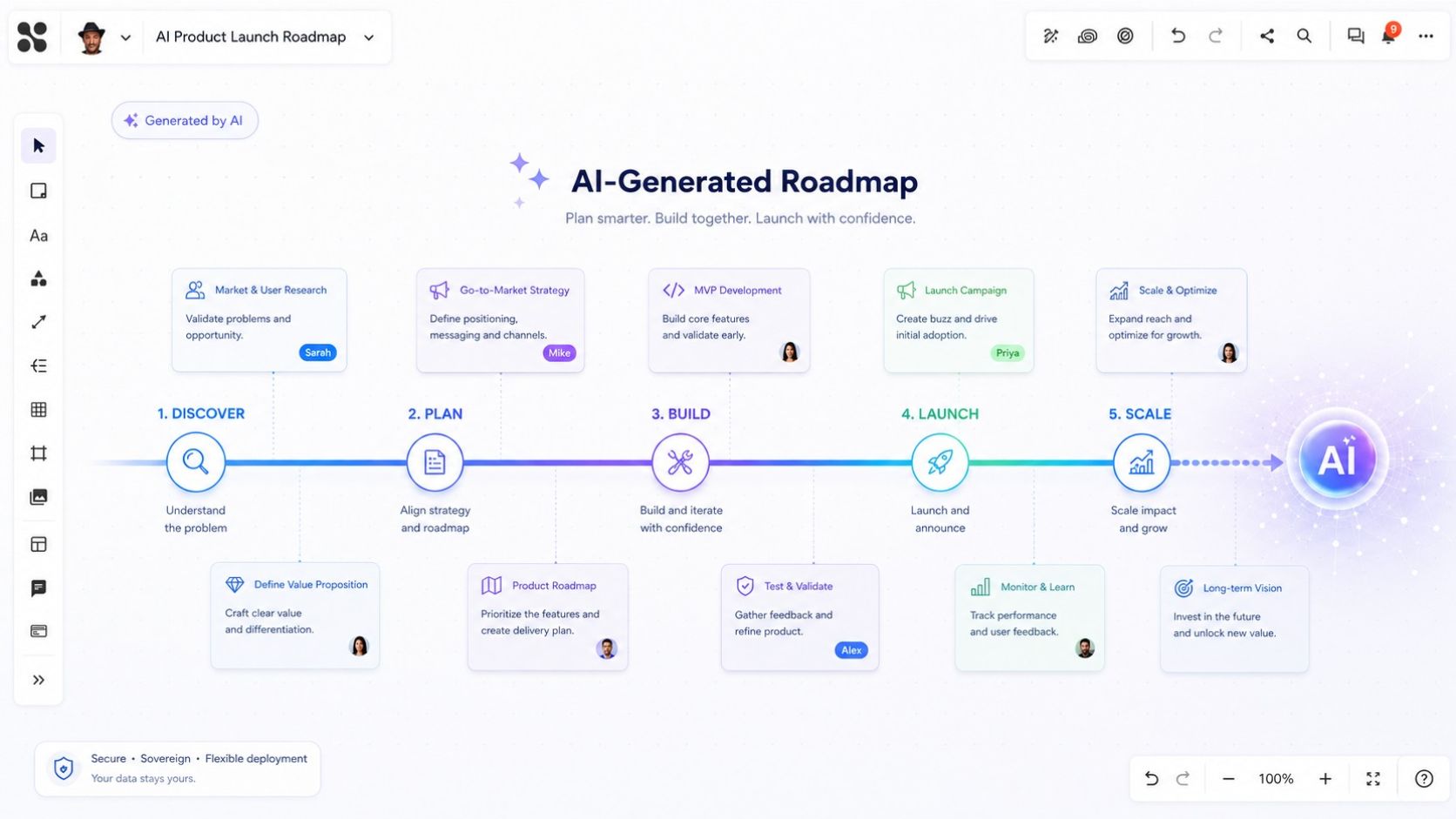

Creating a roadmap with AI is easy. Creating a roadmap that teams can actually edit, discuss, and use over time is much harder.
Roadmaps are one of the most powerful tools for turning ideas, strategies, and plans into something visual, structured, and easy to understand. Whether you are planning a product release, managing a project, preparing a strategy workshop, or aligning stakeholders around future priorities, a roadmap helps everyone see what happens, when it happens, and why it matters.
But creating a good roadmap still takes time. You need to collect the right information, structure it clearly, define milestones, choose a useful layout, add visual elements, and make sure the result is easy to understand.
This is where AI and online whiteboards become a powerful combination.
AI can help generate the structure, content, and first visual version of a roadmap. An online whiteboard gives the roadmap the space and flexibility it needs. Instead of being limited by slides, documents, or static graphics, teams can create roadmaps on an infinite canvas where they can continue to collaborate, refine, discuss, and extend the plan.
An AI-generated roadmap is a visual planning board created with the help of artificial intelligence. Instead of manually designing the layout, teams can let AI generate the first structure, including phases, milestones, tasks, risks, and dependencies. When created on an online whiteboard, the roadmap remains editable, collaborative, and easy to expand.
Why Traditional AI Outputs Are Often Not Ideal for Roadmaps
AI tools such as ChatGPT, Claude, Mistral, or other generative AI solutions can already create impressive outputs. They can generate HTML files, PowerPoint presentations, tables, documents, and structured plans within seconds.
For many use cases, this works well.
But roadmaps are different.
A roadmap is not just a piece of content. It is a visual planning tool. It often needs space, flexibility, and collaboration. This is where traditional formats quickly reach their limits.
PowerPoint Roadmaps Are Limited by Slide Size
PowerPoint is a familiar tool for presenting roadmaps. But it is built around slides, and slides have fixed boundaries.
This works for short executive summaries or high-level presentations. But as soon as the roadmap becomes longer, more detailed, or more collaborative, the slide format becomes restrictive.
Long-term product roadmaps, transformation programs, multi-phase project plans, and strategic initiatives often do not fit well into a single slide. Splitting them across several slides can make the overview harder to understand.
A roadmap needs room to grow.
Static Roadmaps Are Hard to Collaborate On
Many roadmaps are created as static graphics, PDFs, or presentation slides. These formats are useful for sharing information, but they are less useful for collaboration.
Teams often need to discuss priorities, add comments, assign tasks, link supporting documents, collect feedback, and update the roadmap over time.
A roadmap should not only be something you present. It should be something your team can work with.
HTML Roadmaps Can Be Difficult to Edit
AI-generated HTML files can look beautiful at first glance. They may include colors, cards, timelines, columns, and animations. But once the roadmap needs to be changed, edited, or discussed by a team, the limitations become obvious.
Most users do not want to edit HTML code. Even small adjustments, such as moving a milestone, changing the order of phases, adding a task, or restructuring a section, can become complicated.
A roadmap should be easy to change. HTML is often not the best format for that.
Why Online Whiteboards Are Ideal for Roadmaps
An online whiteboard solves many of the challenges that appear when creating roadmaps in traditional formats.
The most important advantage is space.
With an online whiteboard, you are not limited to a page, a slide, or a fixed document structure. You can use an infinite canvas to create roadmaps that move horizontally, vertically, or in multiple directions. This makes it much easier to visualize longer timelines, complex initiatives, dependencies, milestones, and different workstreams.
Roadmaps Need Space, Context, and Collaboration
A roadmap is more than a timeline. It often includes several layers of information, such as:
- Goals and strategic objectives
- Phases and milestones
- Features or deliverables
- Tasks and responsibilities
- Risks and dependencies
- Timeframes and deadlines
- Stakeholder feedback
- Links to documents, tickets, or other resources
- Decisions and open questions
On a traditional slide, this information can quickly become crowded.
On an online whiteboard, it can be structured visually. Teams can zoom in and out, move between high-level and detailed views, and add more information where it belongs.
A Roadmap on a Whiteboard Becomes a Workspace
One of the biggest advantages of creating a roadmap on an online whiteboard is that the roadmap does not have to remain a static visual.
It can become a collaborative workspace.
The roadmap may start as a visual overview, but teams can continue to work directly on it. They can add sticky notes, tasks, comments, links, files, decisions, screenshots, user stories, or workshop results.
In Collaboard, this means a roadmap can become more than a visual timeline. Teams can continue working with editable elements, sticky notes, comments, tasks, links, files, and workshop areas directly on the board.
For example, a product roadmap can include planned features, customer feedback, release phases, sprint goals, and links to Jira tickets. A project roadmap can include milestones, risks, responsibilities, and decisions. A strategy roadmap can include initiatives, success metrics, dependencies, and workshop outcomes.
How AI Improves Roadmap Creation
Creating a beautiful and useful roadmap usually takes time. The most time-consuming part is often not the content itself, but the layout.
Where should the roadmap start? How should the phases be arranged? Which milestones need more space? How can different workstreams be visualized? What colors should be used? How can the roadmap look professional and still be easy to understand?
AI can speed up this process significantly.
Instead of starting with a blank canvas, you can ask AI to generate a first version of the roadmap directly on an online whiteboard. The AI can create the structure, arrange the content, add visual elements, suggest milestones, group related topics, and apply a specific style.
The result is not just text. It is a visual starting point that your team can continue to edit and improve.
Roadmap Use Cases AI Can Help With
AI-generated roadmaps can support many different planning scenarios. Product and project roadmaps are the most common examples, but the same approach also works for strategy, transformation, marketing, sales, technology, and HR planning.
Instead of starting from a blank canvas, teams can give the AI their goals, milestones, timelines, and key activities. The AI can then create a first visual roadmap that can be reviewed, edited, and expanded on the whiteboard.
The following examples show how different teams can use AI-generated roadmaps in practice.
Product Roadmaps
Product teams can use AI to visualize upcoming features, release phases, customer value, priorities, technical dependencies, and go-to-market activities. This helps product managers, developers, designers, sales teams, and leadership align around the product direction.
Project Roadmaps
Project managers can use AI to create visual roadmaps with project phases, milestones, deliverables, responsibilities, risks, dependencies, and decision points. This is especially useful for kickoff meetings, stakeholder updates, and planning workshops.
Strategy Roadmaps
Strategy roadmaps help turn high-level goals into a clear visual plan. AI can structure strategic objectives, initiatives, time horizons, focus areas, success metrics, owners, and review points so teams can discuss strategy in a more concrete way.
Transformation Roadmaps
Organizations can use AI-generated roadmaps to visualize digital transformation, process improvement, organizational change, or cultural change. These roadmaps can show the current state, future state, change initiatives, communication activities, training phases, adoption milestones, and risks.
Marketing Roadmaps
Marketing teams can use AI to plan campaigns, content calendars, product launches, webinars, events, email campaigns, social media activities, and performance review points. This creates a clear overview of what needs to happen and when.
Sales Roadmaps
Sales teams can use roadmaps to plan market expansion, account development, sales enablement, partner activities, outreach campaigns, revenue goals, and review meetings. This helps connect sales activities with strategic business goals.
Technology Roadmaps
IT and engineering teams can use AI-generated roadmaps to plan architecture changes, system upgrades, infrastructure projects, security initiatives, integrations, migrations, and technical debt reduction.
HR and People Roadmaps
HR teams can use roadmaps to plan onboarding programs, hiring phases, leadership development, employee engagement initiatives, internal communication, policy updates, and feedback cycles.
What Information Should You Give the AI?
The quality of the AI-generated roadmap depends heavily on the information you provide.
The more context you give the AI, the better the result will be. You do not need to have a perfect plan before you start, but you should provide as much useful information as possible.
A good roadmap prompt should include:
- Purpose: What is the roadmap about and what should it help achieve?
- Audience: Who will use or present the roadmap?
- Timeframe: Which period should the roadmap cover?
- Structure: Which phases, milestones, workstreams, or priorities should be included?
- Content: Which tasks, deliverables, risks, dependencies, owners, or status information are important?
- Detail level: Should the roadmap be high-level for leadership or detailed for operational planning?
- Collaboration areas: Where should the team add ideas, questions, risks, or decisions later?
- Visual direction: Which colors, layout, style, and whiteboard elements should be used?
For example, a product release roadmap could include planned features, development phases, testing activities, launch milestones, go-to-market tasks, and key dependencies. A transformation roadmap could include the current state, future state, change phases, stakeholder groups, communication activities, training, risks, and adoption milestones.
Let AI Enrich Your Roadmap
You do not need to provide every detail from the beginning. AI can also help improve and complete your roadmap.
You can ask the AI to suggest missing milestones, identify risks and dependencies, add tasks for each phase, define success metrics, create an executive-friendly version, or turn a rough idea into a structured roadmap.
This is especially useful when you already have a first draft but want to make it more complete, more visual, or easier to discuss with your team.
Define the Visual Style and Layout
A roadmap is not only about information. It is also about clarity. Good design helps people understand what matters, how activities are connected, and where attention is needed.
That is why your prompt should also describe how the roadmap should look. You can define the color palette, brand colors, visual mood, layout type, orientation, spacing, icons, shapes, connectors, frames, sticky notes, and areas for collaboration.
For example, you can ask for a clean business roadmap in blue, grey, and white. Or you can request a futuristic roadmap with a dark background, bold milestone cards, and modern icons.
The layout also matters. Depending on your use case, you can ask AI to create:
- Timeline roadmap: Best for product releases, project plans, campaigns, and implementation plans.
- Swimlane roadmap: Best for cross-functional projects with several teams or workstreams.
- Journey roadmap: Best for strategy, change management, learning paths, or transformation initiatives.
- Milestone roadmap: Best for executive updates, steering committees, and high-level stakeholder communication.
- Kanban-style roadmap: Best for agile planning, backlogs, delivery planning, and prioritization.
- Quarterly roadmap: Best for annual planning, OKRs, marketing planning, and business strategy.
- Theme-based roadmap: Best for long-term product strategy, innovation planning, and organizational development.
By combining clear content instructions with visual guidance, AI can create a roadmap that is not only informative, but also easy to understand, present, and refine collaboratively.
Example Prompt for Creating an AI-Generated Roadmap
To get better results, your prompt should combine the roadmap content, the desired structure, and the visual style. This helps the AI understand not only what should be included, but also how the roadmap should be arranged on the whiteboard.
Here is a simple prompt template you can adapt:
Create a roadmap on the secure online whiteboard Collaboard for [topic]. The roadmap should help [target audience] understand [goal]. Cover the timeframe from [start date] to [end date] and include the main phases, milestones, tasks, risks, dependencies, and responsibilities.
Use a [timeline / swimlane / journey / quarterly / milestone] layout. Add clear sections, enough space for collaboration, and dedicated areas where the team can add questions, ideas, risks, and decisions later.
Use a [professional / modern / futuristic / simple] visual style with [colors or brand colors]. Create the roadmap with editable whiteboard elements such as shapes, sticky notes, text boxes, frames, icons, arrows, and connectors. Do not create a static image.
The most important best practice is to treat the AI-generated roadmap as a first version, not as the final result. Let AI create the structure and visual starting point, then review it with your team, add missing context, clarify priorities, and turn the roadmap into a living workspace.
Creating AI-Generated Roadmaps with Collaboard and the Collaboard MCP Server
With Collaboard and the Collaboard MCP Server, AI-generated roadmaps can become more than a text response or a static visual. They can be created directly on a secure and sovereign online whiteboard, using editable whiteboard elements such as shapes, sticky notes, text boxes, frames, icons, arrows, and connectors.
This means teams can use AI to generate a first roadmap structure and then continue working on it directly in Collaboard. The roadmap can be reviewed, refined, discussed, extended, and turned into a collaborative planning workspace.
For organizations with high security and data protection requirements, this is especially important. Collaboard can be used as a cloud solution or operated on-premises in your own infrastructure. This gives organizations more control over where their data is processed and stored.
The Collaboard MCP Server also opens up interesting possibilities for organizations that want to connect AI with their whiteboard workflows in a more controlled way. Depending on the setup, teams can work with cloud-based AI models or self-hosted AI models, while still creating visual, editable roadmaps in Collaboard.
This makes AI-generated roadmap creation relevant not only for creative teams or product teams, but also for organizations in regulated industries, public administration, education, healthcare, finance, and other environments where secure collaboration, data sovereignty, and flexible deployment options matter.
Learn here how to connect your AI tool to Collaboard.
Why AI-Generated Roadmaps Are More Than a Productivity Shortcut
The biggest benefit of AI-generated roadmaps is not only speed.
Yes, AI can save time. It can create a first visual structure much faster than starting manually. But the real value is that AI helps teams move from abstract ideas to a shared visual workspace.
Instead of discussing a roadmap in a document or trying to fit everything into a slide, teams can work on an editable visual canvas. They can see the big picture, add details, discuss risks, clarify ownership, and turn the roadmap into action.
This changes the role of the roadmap.
It becomes a shared planning space for alignment, decision-making, and collaboration.
Conclusion: AI and Online Whiteboards Make Roadmaps Easier to Create and Better to Use
Roadmaps are essential for planning and alignment, but they are often difficult to create, maintain, and collaborate on.
AI helps teams generate roadmap structures faster. Online whiteboards provide the space and flexibility to make those roadmaps useful.
Together, AI and online whiteboards make it possible to create roadmaps that are visual, editable, collaborative, and ready for real teamwork.
Instead of spending hours on layout and formatting, teams can start with an AI-generated roadmap and focus on what really matters: priorities, decisions, responsibilities, and progress.
For product planning, project management, strategy execution, digital transformation, marketing, sales, technology, or HR initiatives, AI-generated roadmaps on an online whiteboard can help teams move faster from idea to action.
On This Page

Start for free with Collaboard
Create your first online whiteboard, invite others and start collaborating visually.
You can use Collaboard for free and upgrade later whenever your needs grow.
*No credit card required
Michael Görög
Co-Founder Collaboard
Michael Görög is co-founder of Collaboard and is passionate about digital collaboration, visual work and the future of teamwork. He regularly shares practical insights on online whiteboards, collaboration methods, AI and new ways of turning ideas into action.

.avif)
Frequently asked questions
Any questions? We are here to help.
An AI-generated roadmap is a roadmap created with the help of artificial intelligence. The AI can structure information, suggest phases, add milestones, define tasks, identify risks, and create a first visual version of the roadmap. When generated on an online whiteboard, the roadmap can remain editable and collaborative.
An online whiteboard gives you more space and flexibility than slides or documents. You can create roadmaps on an infinite canvas, add more details over time, collaborate with your team, collect feedback, assign tasks, and link supporting information directly on the board.
Yes. AI can help create product roadmaps by organizing features, releases, customer needs, priorities, dependencies, and go-to-market activities. It can also generate project roadmaps with phases, milestones, deliverables, tasks, responsibilities, risks, and dependencies. Both can be used as starting points for planning, alignment, and stakeholder communication.
You should provide the topic, goal, target audience, timeframe, phases, milestones, tasks, responsibilities, risks, dependencies, desired layout, visual style, and level of detail. The more context you provide, the better the AI-generated roadmap will be.
An AI-generated roadmap can be a very strong starting point, but it should usually be reviewed and refined by the team. The best results come when AI creates the first structure and humans add context, priorities, decisions, and expert knowledge.
AI can help create product roadmaps, project roadmaps, strategy roadmaps, transformation roadmaps, marketing roadmaps, sales roadmaps, technology roadmaps, HR roadmaps, and many other planning visuals.
PowerPoint slides have fixed boundaries, which can be limiting for long or complex roadmaps. An online whiteboard offers an infinite canvas, making it easier to visualize longer timelines, multiple workstreams, dependencies, and detailed planning information.
You can improve the quality by giving the AI clear instructions, providing enough context, defining the desired structure, specifying the visual style, and asking for editable whiteboard elements. You can also ask the AI to add missing milestones, risks, dependencies, or collaboration areas.
Yes. For most business use cases, the roadmap should remain editable. This allows the team to update the roadmap, add feedback, change priorities, assign tasks, and continue working with it after the first version has been created.
Subscribe to the newsletter
Stay up to date with the latest tips and news on collaboration.
Start your next whiteboard now
Get a free trial of Collaboard with up to 3 boards and five people per session. All key features are available for you to try out.

