Create flowcharts online with Collaboard
Learn what a flowchart is, which types there are and how to create one online ↓
What is a flowchart?
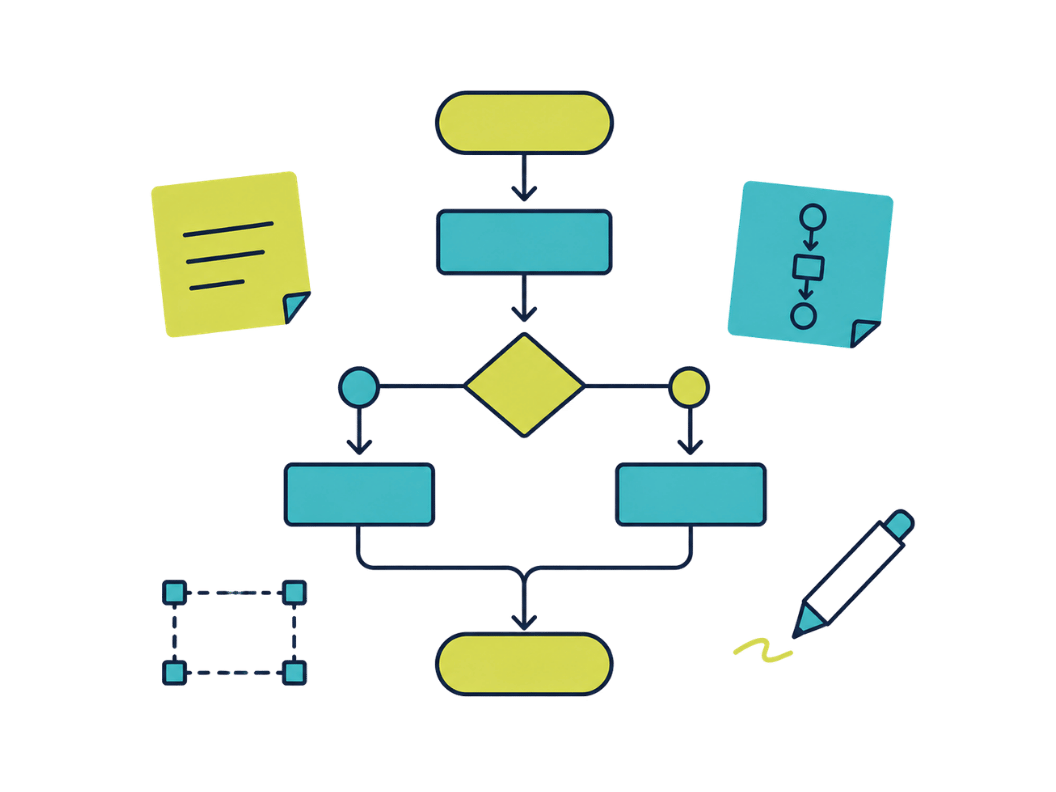
A flowchart is a visual representation of a process or workflow. The individual steps and decisions are shown as symbols that are connected by lines. The lines show the direction in which the process runs.
Flowcharts are also called "process flow diagrams" or "workflow diagrams" and are often used to document workflows and decision-making processes.
Once a process is visualized, potential problems become apparent quickly and room for improvement is easier to spot. Flowcharts are used across industries to map business processes, manufacturing workflows, data flows and simple to complex processes of all kinds.
The history of flowcharts
The history of flowcharts goes back to the 19th century. The British engineer Charles Babbage, who is considered the father of the computer, used diagrams to show how his Analytical Engine worked.
In the early 1920s, flowcharts were used as a tool to improve production processes and increase efficiency. The American engineer Frank Gilbreth was one of the first to use flowcharts in industry.
In the 1940s, flowcharts became increasingly popular as a way of representing industrial processes. During this time, the US Army and Air Force also used them to visualize complex military processes.
Later, flowcharts became an integral part of Six Sigma, a method for quality improvement and error prevention in production developed by Motorola.
As computers became more widespread in the 1960s and 1970s, flowcharts grew more important as a tool for representing computer programs and processes. This period also saw the foundations of modern programming languages, many of which contain elements borrowed from flowcharts.
Today, flowcharts are a widely used tool in many industries and fields to visualize and optimize complex processes and workflows.
Advantages and disadvantages of flowcharts
The main advantage of a flowchart is that complex processes and decisions are shown visually. The visual representation provides a clear overview, which makes processes easier to understand.
Everyone involved can see at a glance what the process is about. This builds a shared understanding and improves communication around the process. Alignment becomes faster and fewer mistakes happen.
When flowcharts are created online, everyone involved can access them from anywhere and make changes or additions in real time. This flexibility is especially important in hybrid work, where people in different locations are part of the same process.
The biggest disadvantage of flowcharts is that creating them can quickly become time-consuming, especially for complex processes. Flowcharts are also often a simplified version of the real process, which can lead to misinterpretations or wrong decisions. In most cases, however, the advantages outweigh the disadvantages.
Examples: what flowcharts are used for
Data flow diagram
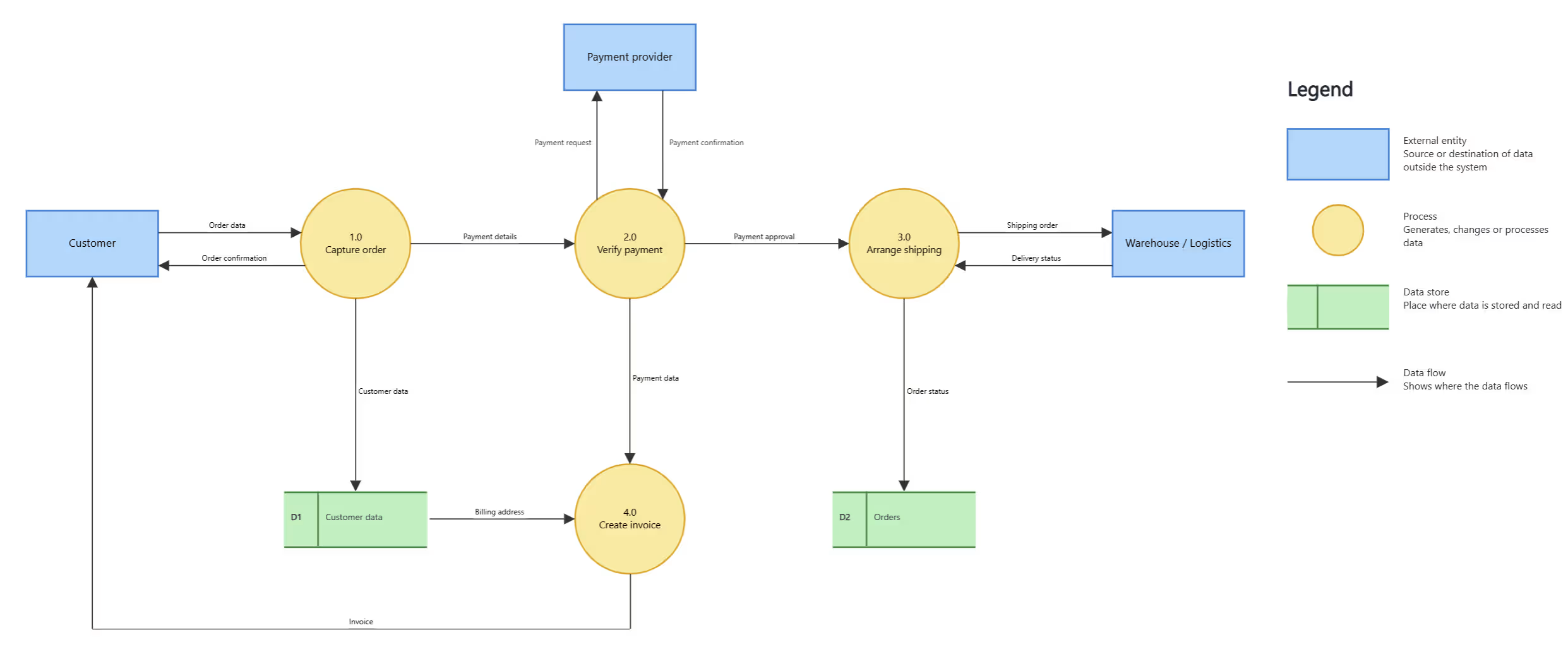
A data flow diagram visualizes how data moves through a system. It shows which actions generate data, where that data flows and how it is changed and processed.
Business process flowchart
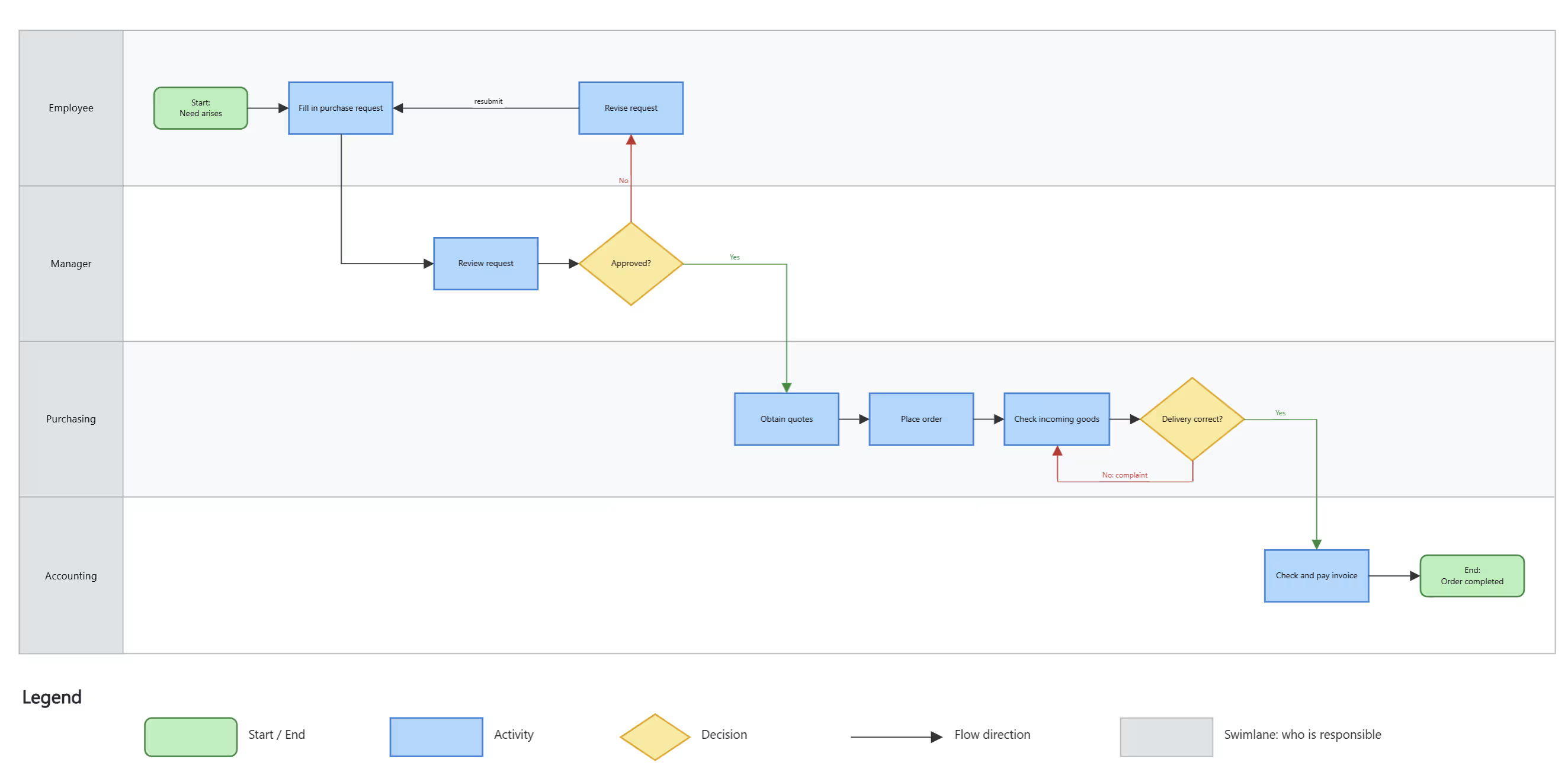
Many business processes such as order processing, purchasing, approvals or hiring are documented and visualized with flowcharts. This makes it easier for everyone involved to understand and follow these processes.
Decision flowchart
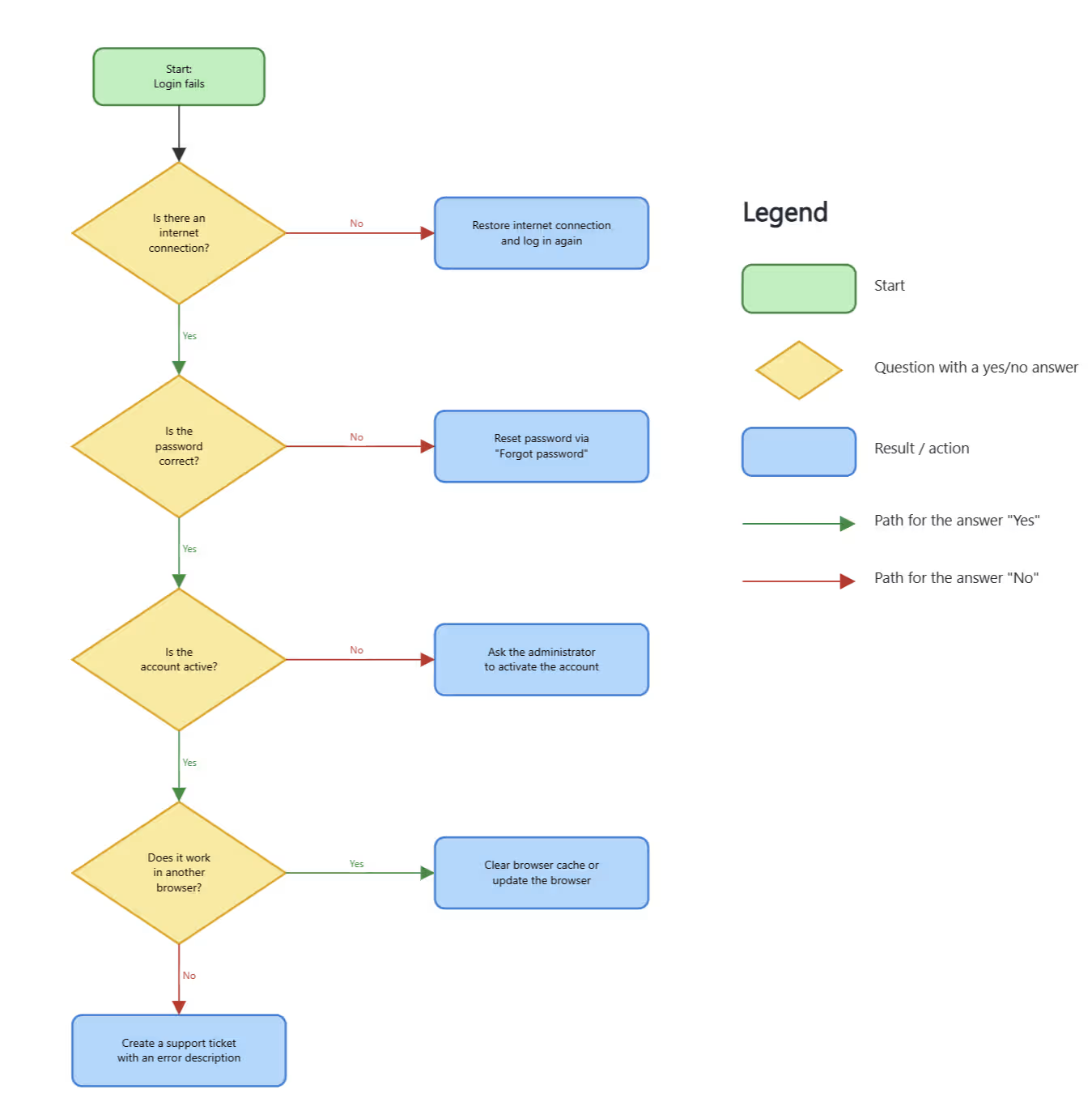
A decision flowchart shows which questions are answered in which order and which path follows from each answer. Yes-or-no branches are typical, for example for approvals, support requests or troubleshooting.
Flowchart standards: UML and BPMN
Over time, various methods have been developed that define how flowcharts are built. Two of the best known, used mainly in software development and business process modeling, are UML (Unified Modeling Language) and BPMN (Business Process Model and Notation). Standardized flowcharts have the advantage that others can understand and reuse them more quickly.
There is specialized software for creating flowcharts digitally. One of the newer options is the online whiteboard, where teams can create flowcharts easily and together.
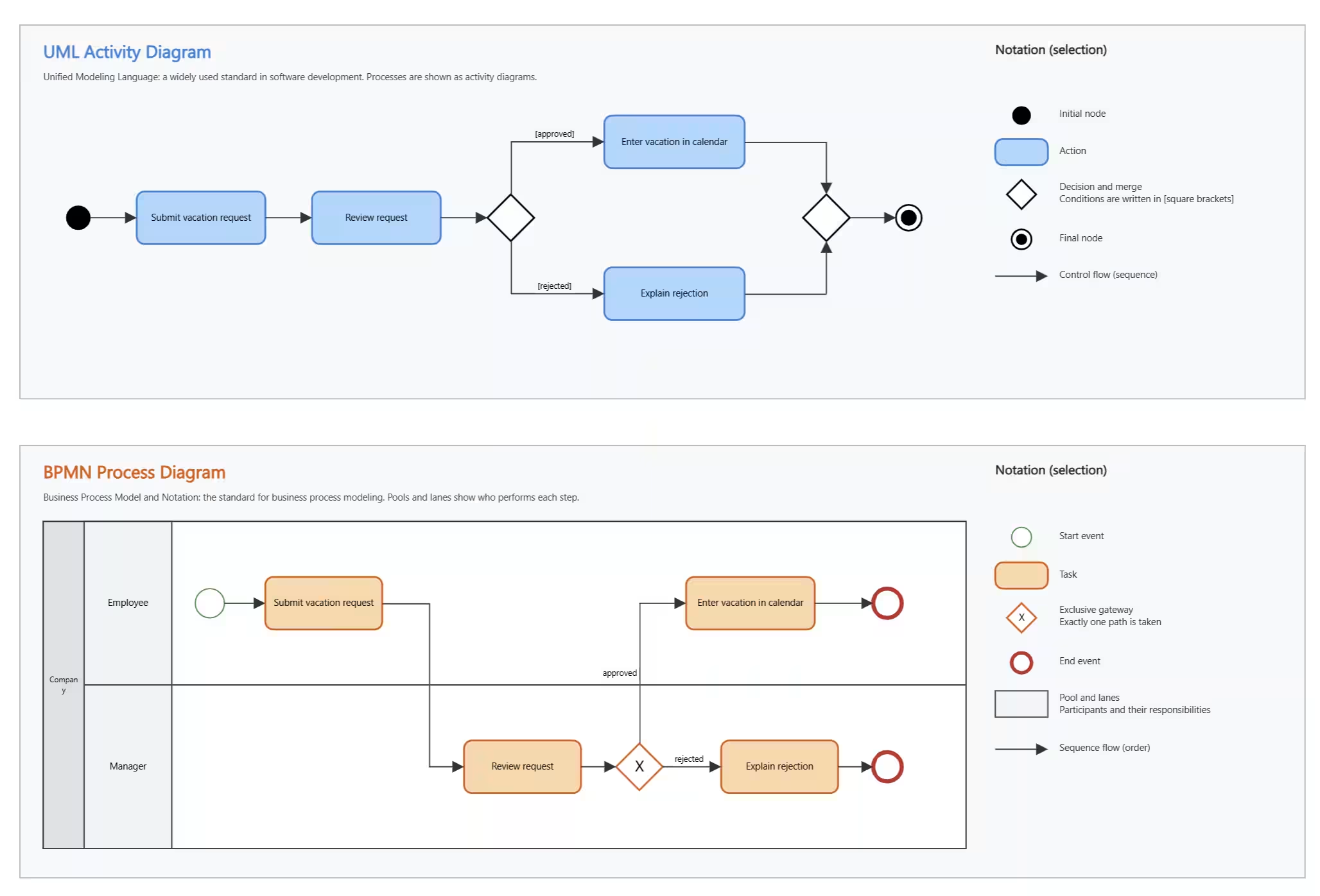
Types of flowcharts
Flowcharts have been used in many different forms for more than 100 years. The following list contains the best-known types:
- Process flowchart
- Decision flowchart
- Workflow diagram
- Data flow diagram
- Swimlane flowchart
- BPMN diagram
- Fishbone diagram (Ishikawa diagram)
- UML activity diagram
- Document flowchart
- Process control flowchart
- PERT chart
- Quality control flowchart
- Circuit diagram flowchart
- Service blueprint
- Customer journey flowchart
- Production planning flowchart
- Troubleshooting flowchart
- Process descriptions for data protection and data security
For most types of flowcharts there are templates that make getting started easier. They often contain simple examples you can use as a guide when building a more complex flowchart.
In the next section, you will learn how to create a flowchart and which symbols to use.
How to create a flowchart
Flowcharts used to be drawn on paper, whiteboards or chalkboards. Today, most flowcharts are created online with software. Processes and dependencies are becoming more and more complex in a digital, connected working world, and such processes can only be represented and kept up to date properly with a dedicated tool.
Choose the right symbol for each step
Depending on the type and method, different symbols are available. Before you start, think about what you want to achieve with the flowchart and which symbols will represent the process best.
Since every flowchart has a start and an end, there are standard symbols that most flowcharts use. Here are the most important ones:
- Rectangle: represents a process step or an activity.
- Diamond: represents a decision with a yes or no answer.
- Parallelogram: represents an input or output of information.
- Arrow: connects the symbols and shows the direction of the process.
- Oval: represents the start or end of the flowchart.
These symbols are not used the same way everywhere and can vary by industry or application. Some notations, such as BPMN, use their own symbols for specific purposes or processes.
Connect the symbols into a logical flow
To show the flow, connect the symbols with lines. An arrow at the end of a line shows the direction. Depending on the method, connecting lines are solid, dotted or dashed. In more complex processes, lines can cross, for example when several processes run in parallel.
Set up pools and swimlanes
Processes that involve several systems or departments need to show clearly who is responsible for each step. Swimlanes have become the standard way to do this. The process is mapped onto a layout that looks like a swimming pool seen from above. Each lane stands for a person, an organizational unit or a system.
Swimlanes can run horizontally or vertically. Several swimlanes are grouped into a pool that gives a clear overview of the entire process. For complex processes, you can combine several pools, with each pool representing a subprocess.
Add labels and a legend
To make the flowchart truly clear, add labels and a legend in the right places. They explain details and make the process easier to understand.
Create flowcharts in Collaboard
With the online whiteboard Collaboard, you can create flowcharts on your own or as a team. On the unlimited canvas, you model processes with familiar symbols and connectors, and everyone works on the same diagram in real time. For a quick start, Collaboard also offers a flowchart template.
You can create flowcharts with the free version of Collaboard and get started right away with up to five people per session.
On This Page
Turn this use case into your own whiteboard
Create a free Collaboard account and start working visually with your team today.
No credit card required
Flowchart - Frequently asked questions & answers
Do you have any questions? We're here to help.
Online whiteboard tools are particularly well-suited for creating flowcharts. They offer an infinitely large canvas, so even complex processes can be visualized without restrictions. Since multiple people are often involved in creating flowcharts, it is recommended to choose collaborative software that enables real-time digital collaboration.
A flowchart is the visual representation of a process. It shows which steps are taken, which participants are involved and thus provides a clear overview of processes ranging from simple to highly complex, across a wide range of areas.
A flowchart consists of various symbols that are connected to each other, representing a process flow. Depending on the flowchart, different symbols and representations are used. Flowcharts have a specific direction in which the flow moves, usually displayed horizontally or vertically. Since flowcharts are often created on a whiteboard, the background is typically white and the symbols are black.
A flowchart is created using a program that provides the appropriate symbols, connecting lines and annotation functions. You start at the origin of the process and then model the individual steps. For more complex processes involving multiple participants and systems, the flowchart is structured with swim lanes and pools so that individual steps can be more easily distinguished from one another.
A flowchart generally represents a process showing how a goal is reached from a starting point via various process steps. Depending on the type of flowchart, what it depicts exactly may vary. Most commonly, flowcharts represent data flows and business process workflows.
When creating a flowchart, you should first decide on the level of detail the diagram should have. The choice of symbols is also crucial – it is often worth following a recognized standard, as this makes the flowchart easier to read. It is also important to consider who should be involved in creating the flowchart. Especially when processes span multiple departments, it is essential to involve all relevant people from the very start.
Since flowcharts often visualize business-critical processes, special attention must be paid to data privacy. Many cloud solutions for creating flowcharts only partially meet the high security requirements of companies and public authorities. It is therefore important to carefully select the tool you use and ensure it meets your existing security guidelines. For this reason, only GDPR-compliant solutions or self-hostable tools are often used to create flowcharts.
Start your next whiteboard now
Get a free trial of Collaboard with up to 3 boards and five people per session. All key features are available for you to try out.


