
The Next Chapter of Collaboard: Visual Project Management
With Collaboard version 10, we are taking visual collaboration to the next level. New project-management capabilities will connect tasks across whiteboards, introduce interactive views such as Kanban and Gantt, provide a central overview with InfoPool, and expand AI-assisted workflows through the Collaboard MCP Server. The goal: move from idea to execution without losing the visual context.


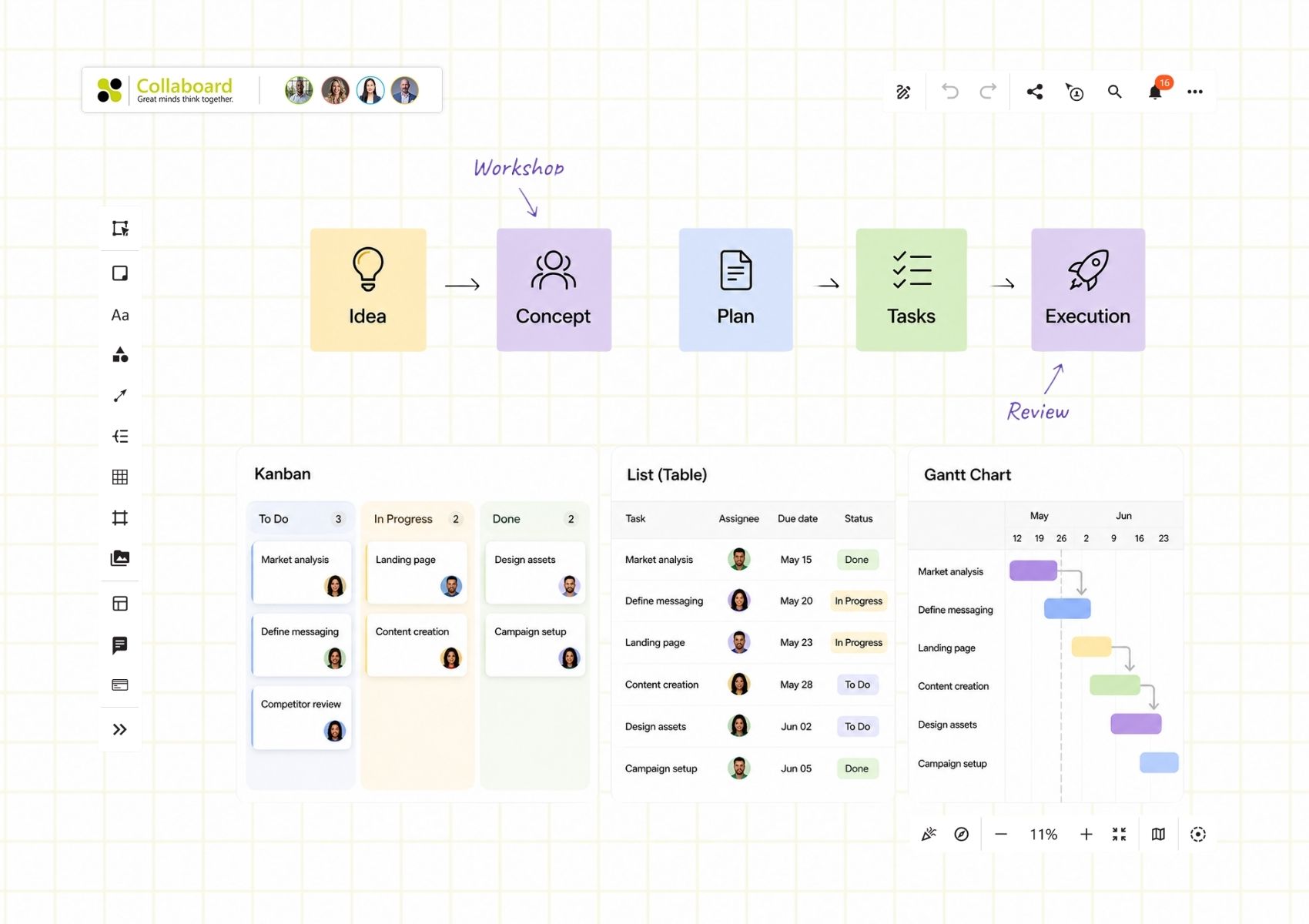

For years, teams have used Collaboard to move from ideas to concepts and from concepts to project plans.
They brainstorm on the whiteboard, run workshops, map processes, build roadmaps, align stakeholders and structure complex initiatives visually.
Collaboard already supports the journey from idea to task with a dedicated task object that allows teams to create tasks directly on the whiteboard, assign them to people and plan their work.
Once execution starts, however, many teams move their tasks into another application. The whiteboard remains the place where the project was understood and planned, while another tool becomes the place where it is actually managed.
With Collaboard version 10, we want to change that.
Going beyond the task object
The next evolution of project management in Collaboard goes far beyond adding more functionality to individual tasks.
Today, a task primarily lives on the board where it was created. With Collaboard 10, we are expanding task management beyond the individual whiteboard. Tasks will become accessible and manageable across boards while remaining connected to the visual content they belong to.
Users will be able to manage tasks centrally from the Collaboard dashboard and across multiple whiteboards without losing their visual context.
At the same time, tasks will become part of interactive project widgets directly on the whiteboard. A Kanban widget, for example, can organize tasks dynamically instead of relying on a static template built from shapes and sticky notes.
A task will no longer be tied to one visual representation. The same task data can be shown in a Kanban board, a structured list or table, or automatically arranged in a Gantt chart.
Update a task in one place, and the change is reflected in the other views.
From static templates to interactive project widgets
This changes something fundamental about the Collaboard canvas.
Until now, many workflows on online whiteboards have been created with static templates. They may look like Kanban boards, project plans or roadmaps, but underneath they are still collections of independent shapes, sticky notes and text elements.
We want to move beyond that.
The canvas should no longer only display project information. It should understand and interact with it.
With interactive widgets, project structures become part of the whiteboard itself. A task can have a status, an assignee, a deadline, dependencies and other structured information that the widget can use and display.
Once tasks become structured objects rather than elements placed manually on a template, much more becomes possible.
We are working on functionality such as approval processes, time estimates, multiple assignees and tasks that can exist and stay synchronized across multiple whiteboards.
The goal is to combine the flexibility of a visual workspace with the structure expected from a modern project-management solution.
See the project, not just the tasks
Projects rarely exist on a single board.
Information is spread across workshops, planning boards, roadmaps, processes, meetings and different teams. Understanding what changed and where action is required can quickly become difficult.
This is where another important part of our vision comes in: InfoPool.
InfoPool will provide a structured overview of relevant activity across Collaboard, such as tasks assigned to you, updates to project content, changes on boards you follow or activities that require your attention.
Instead of opening board after board to understand what happened, users will have a central place to see what is relevant across their workspace.
And because everything remains connected to the visual workspace, it is only one click from this structured overview back to the actual content on the whiteboard.
As Collaboard Co-Founder Michael Görög puts it:
“A structured overview when you need clarity. A visual workspace when you need context.”
From idea to execution in one environment
Our vision for Collaboard has always been broader than simply providing a digital canvas.
Collaboard is a place where teams can think visually together.
With Collaboard 10, we want that journey to continue further:
Idea → Workshop → Concept → Plan → Tasks → Execution → Review
A task can remain connected to the roadmap, process, customer journey, workshop result or discussion that created it.
The visual context does not disappear when an idea becomes something that needs to be executed.
That is what we mean by visual project management.
Visual project management you can self-host
There is another part of this vision that is particularly important to us: visual project management should also be available to organizations that cannot use a conventional SaaS solution.
The new capabilities are therefore planned for both Collaboard Cloud and Collaboard On-Premises, including deployments in highly controlled and air-gapped environments.
Organizations that require greater control over their data and infrastructure should not have to choose between sophisticated project-management capabilities and a deployment model that meets their security and compliance requirements.
Our goal is to provide a powerful visual project-management environment that organizations can also operate within their own infrastructure.
This means organizations with strict security, compliance or data-sovereignty requirements can benefit from advanced visual project management while retaining control over where Collaboard runs and where their project data is stored.
AI as part of visual project management
Structured project information also creates new opportunities for AI.
Through the Collaboard MCP Server, AI tools can already interact directly with content on the whiteboard. As our project-management capabilities evolve, we plan to expand what AI can do with tasks and project information as well.
This could include creating tasks from workshop results, clustering related work, analyzing project information, identifying patterns or helping teams determine relevant next steps.
For us, the important part is that AI does not produce a result somewhere outside the project. Its output becomes part of the same collaborative visual workspace, where the team can review, understand and change it.
This brings together three elements we believe will increasingly shape project work: visual collaboration, structured project information and AI-assisted workflows.
The next chapter of Collaboard
Until now, Collaboard has helped teams move from idea to task.
With Collaboard 10, we want Collaboard to become the place where teams can continue from task to execution without losing the visual context of the project.
This is not about turning the whiteboard into another traditional task-management application.
It is about connecting two worlds that are still separated far too often: the flexibility, creativity and shared understanding of the whiteboard with the structure, transparency and accountability required to execute projects.
We want teams to understand the big picture, manage the details and move between visual collaboration, structured project management and AI-assisted workflows without losing context.
Over the coming weeks and months, we will share more about the individual capabilities, widgets, AI workflows and ideas behind Collaboard 10.
Our vision is simple:
From the first idea to project execution, keep the work connected and visual.
On This Page

Start for free with Collaboard
Create your first online whiteboard, invite others and start collaborating visually.
You can use Collaboard for free and upgrade later whenever your needs grow.
*No credit card required
Michael Görög
Co-Founder Collaboard
Michael Görög is co-founder of Collaboard and is passionate about digital collaboration, visual work and the future of teamwork. He regularly shares practical insights on online whiteboards, collaboration methods, AI and new ways of turning ideas into action.

.avif)
Subscribe to the newsletter
Stay up to date with the latest tips and news on collaboration.
Start your next whiteboard now
Get a free trial of Collaboard with up to 3 boards and five people per session. All key features are available for you to try out.

