
Online Brainstorming: A Step-by-Step Guide from Ideas to Action


.png)

Online brainstorming sessions are a central part of how modern teams collaborate. Whether you are working remotely, in a hybrid setup, or across different locations, brainstorming helps generate ideas, align teams, and move projects forward.
But in reality, many brainstorming sessions fall short.
Ideas are collected. Sticky notes fill the board. Discussions happen.
And after the session, nothing really changes.
The challenge is not a lack of creativity.
It is a lack of structure and follow-through.
In this guide, you will learn a simple but powerful approach to online brainstorming. You will see how to prepare your session, how to guide participants effectively, and most importantly, how to turn ideas into concrete actions.
Why Online Brainstorming Often Fails
At first glance, brainstorming seems simple. You gather people, ask a question, and collect ideas.
However, without a clear process, several problems quickly appear.
Discussions become unstructured, with some participants dominating while others stay quiet. Ideas are written down, but no one takes ownership. And when the session ends, there is no clear decision on what happens next.
As a result, brainstorming becomes a feel-good exercise instead of a productive working method.
To avoid this, you need a clear structure that guides participants from the first idea all the way to execution.
The 4-Step Approach to Effective Online Brainstorming
A successful brainstorming session follows a simple but structured flow:
- Generate ideas
- Organize and cluster them
- Prioritize what matters most
- Turn selected ideas into action
Each step builds on the previous one. Skipping one of them usually leads to weak results.
Preparation – Set the Foundation
The quality of your brainstorming session is largely determined before it even starts.
Start with a clear question
Every brainstorming session needs a clear and focused question. This question defines the direction of thinking and ensures that ideas stay relevant.
For example:
“How can we improve our customer onboarding?”
A vague question leads to vague ideas. A precise question creates useful results.
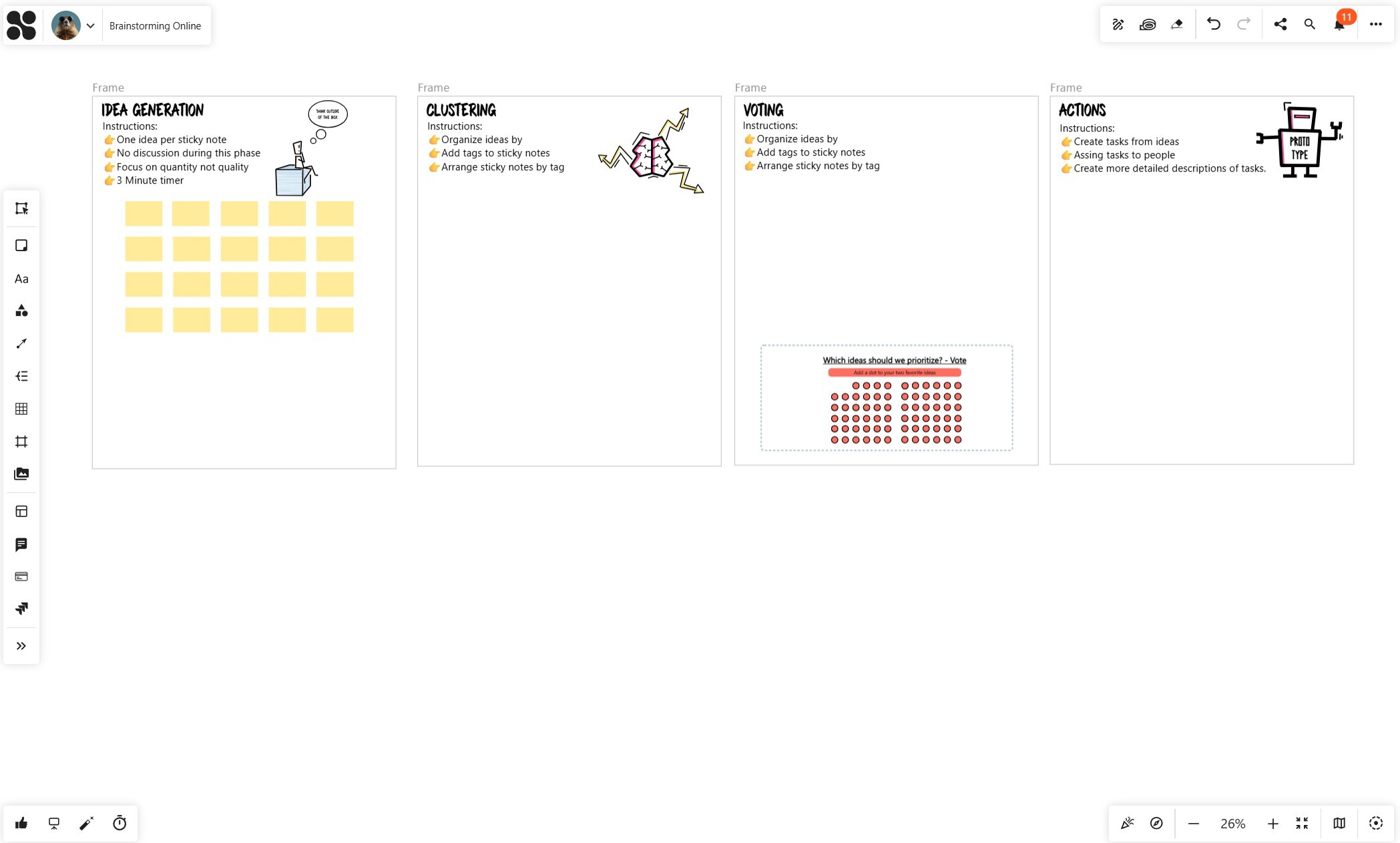
Structure the board in advance
Instead of starting with an empty canvas, it is much more effective to prepare the structure beforehand.
Create clearly separated areas for each phase of the session. For example:
- Idea generation
- Clustering
- Voting
- Actions
This gives participants immediate orientation and reduces the need for explanations during the session.
Add simple instructions
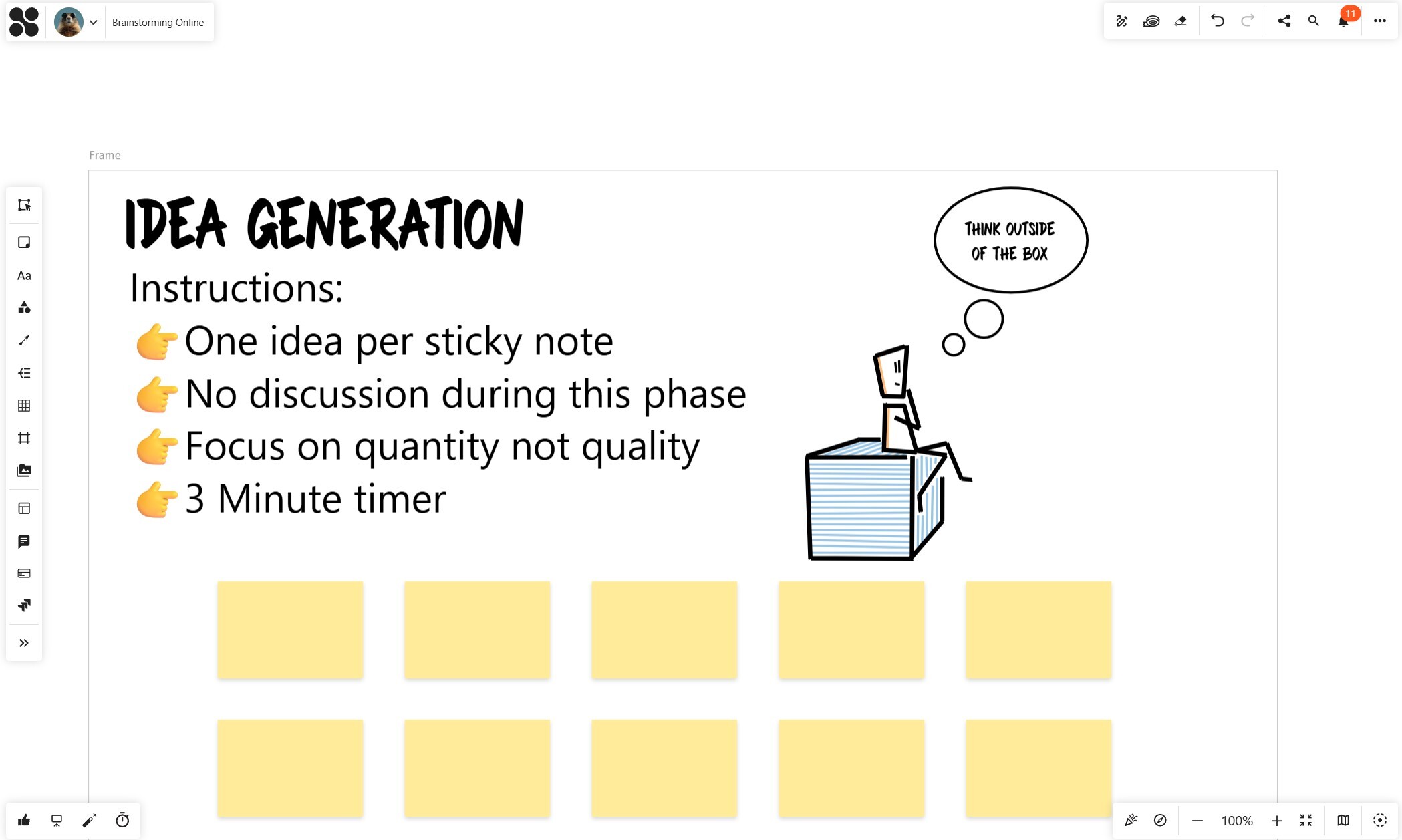
Participants should always know what to do without asking.
Short instructions placed directly on the board help guide behavior. For example, you can define that each idea should be written on a separate sticky note, or that there should be no discussion during the initial phase.
This creates clarity and keeps the session focused.
Prepare elements for participants
Especially in online settings, not everyone is equally familiar with the tool.
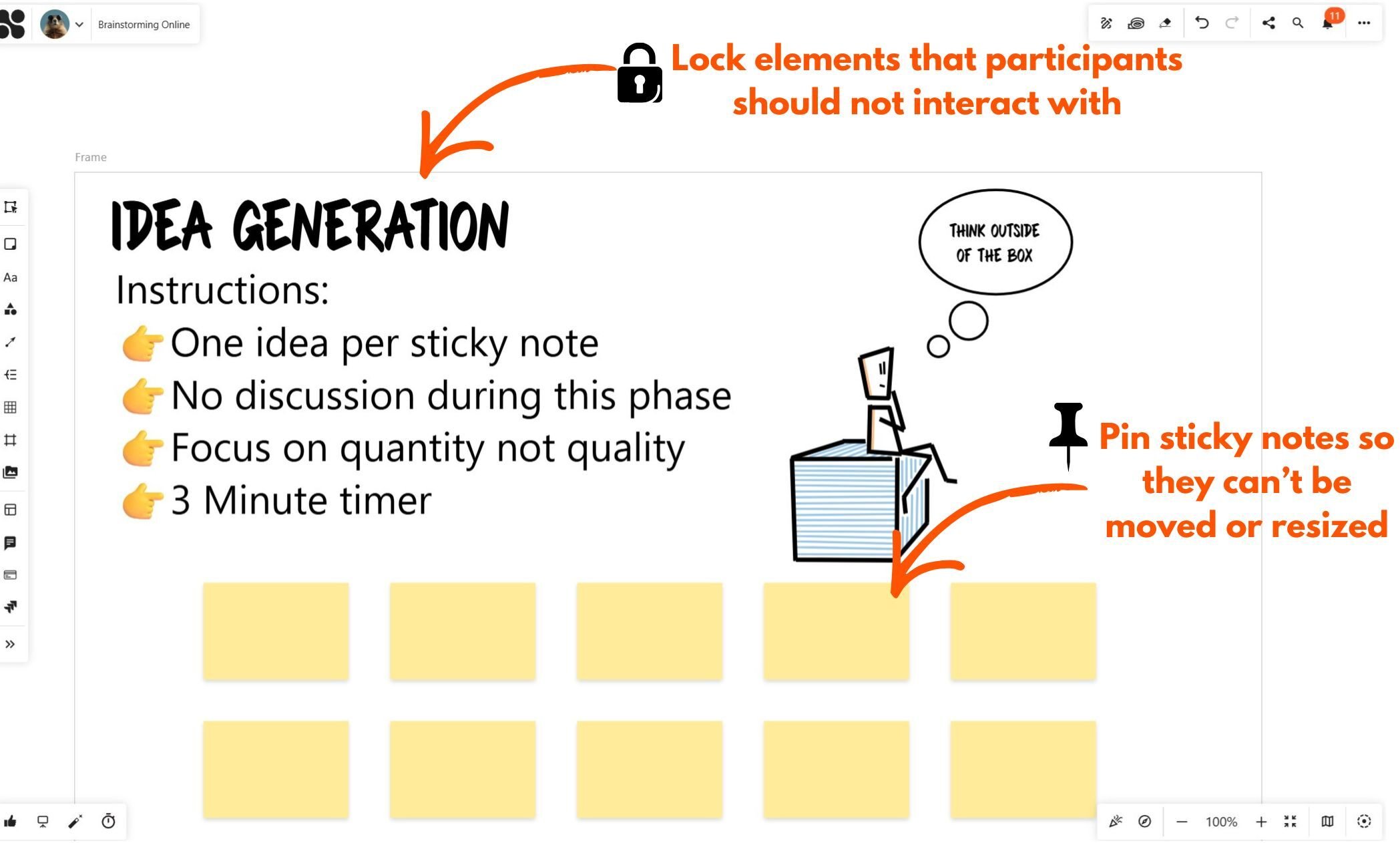
To make participation as easy as possible, you can prepare sticky notes in advance. This allows participants to jump directly into writing ideas instead of figuring out how the tool works.
You can also lock elements like titles and instructions to prevent accidental changes and keep your structure intact. In Collaboard you have also the option to pin an sticky notes. In this case it can't be moved or resized, but people can enter their ideas. If you prepare your board like, this, it makes it even easier for your participants to contribute.
Step 1: Idea Generation – Focus on Quantity
Once the session starts, the first step is to generate as many ideas as possible.
At this stage, it is important to separate idea generation from evaluation. Participants should focus on writing down ideas quickly, without overthinking or discussing them.
A useful technique here is silent brainstorming. Everyone works at the same time, adding their ideas to the board. This approach has several advantages. It avoids interruptions, increases participation, and allows more introverted participants to contribute equally.
The key principle is simple: quantity over quality.
The goal is to create a broad set of ideas that can later be refined and prioritized.
Step 2: Clustering Ideas – Create Structure
After collecting ideas, the board often looks chaotic. This is normal.
The next step is to bring structure into this chaos.
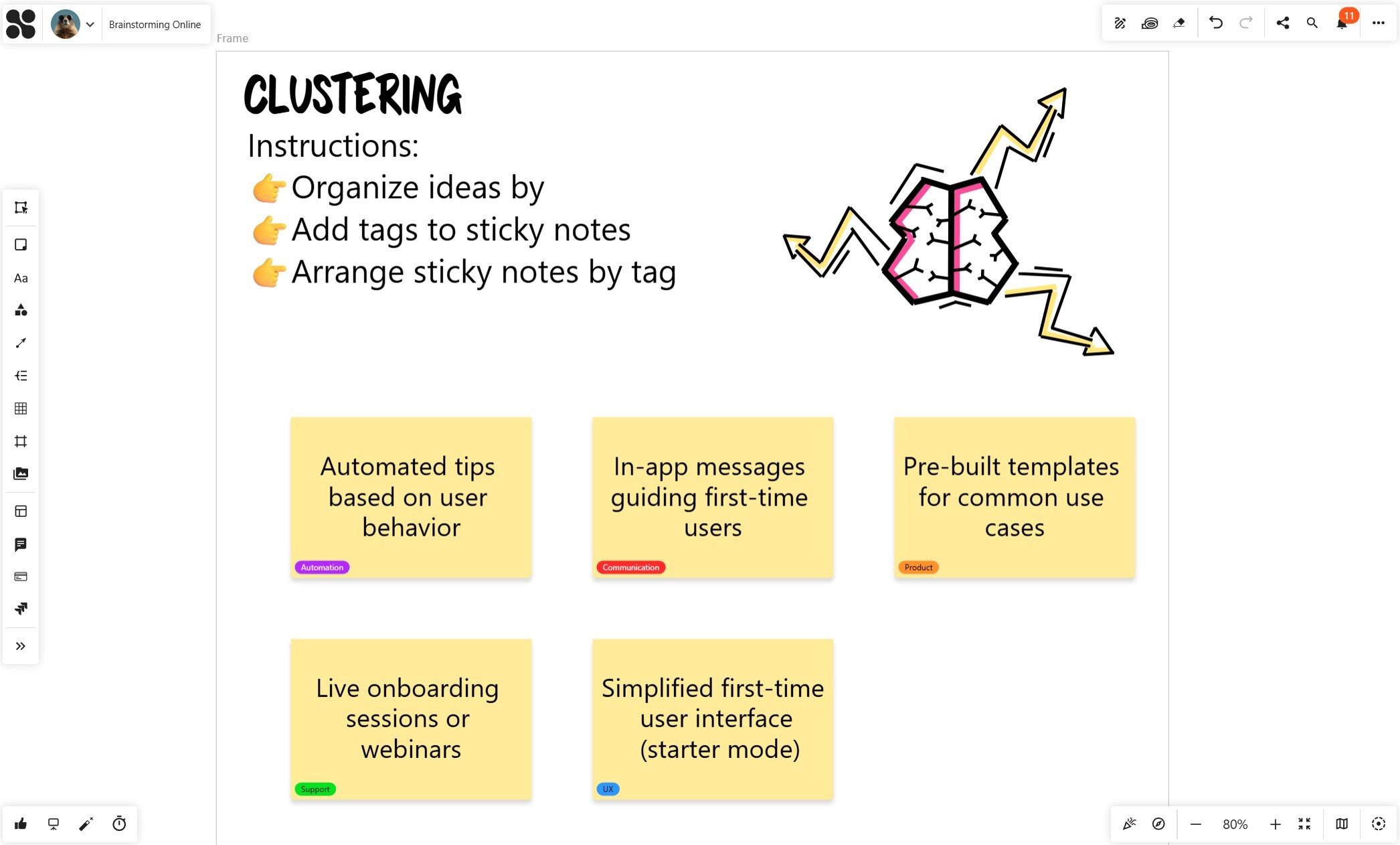
Instead of manually grouping ideas one by one, you can use tags to categorize them. For example, ideas can be tagged based on areas such as product, user experience, communication, support, or automation.
Tagging makes patterns visible. You quickly see which areas have many ideas and where there might be gaps.
Once tags are applied, ideas can be arranged automatically. This creates clear clusters and makes it much easier to understand the overall picture.
At this point, the brainstorming session shifts from creativity to clarity.
Step 3: Voting and Prioritization – Focus on What Matters
Now that ideas are structured, the next step is to decide which ones are worth pursuing.
Without prioritization, brainstorming remains incomplete.
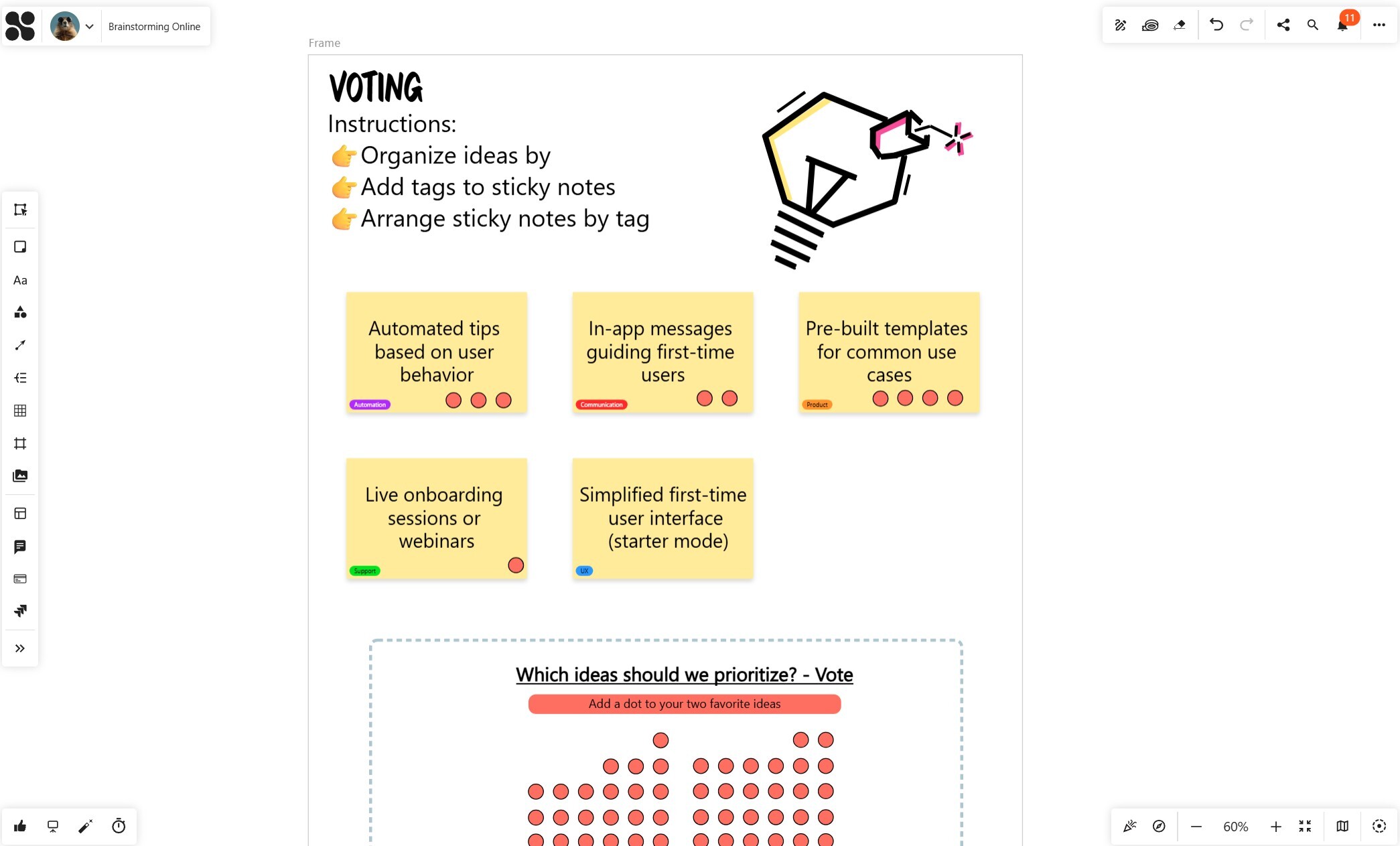
A simple and effective method is dot voting. Each participant selects a limited number of ideas they consider most valuable. This forces everyone to make conscious decisions instead of spreading attention across all ideas.
For more advanced scenarios, you can use structured voting methods such as ratings. This allows a more nuanced evaluation and helps identify the strongest ideas.
The goal of this step is to create alignment. The team should clearly see which ideas have the highest potential and deserve further attention.
Step 5: Turning Ideas into Action
A brainstorming session only creates value if it leads to action.
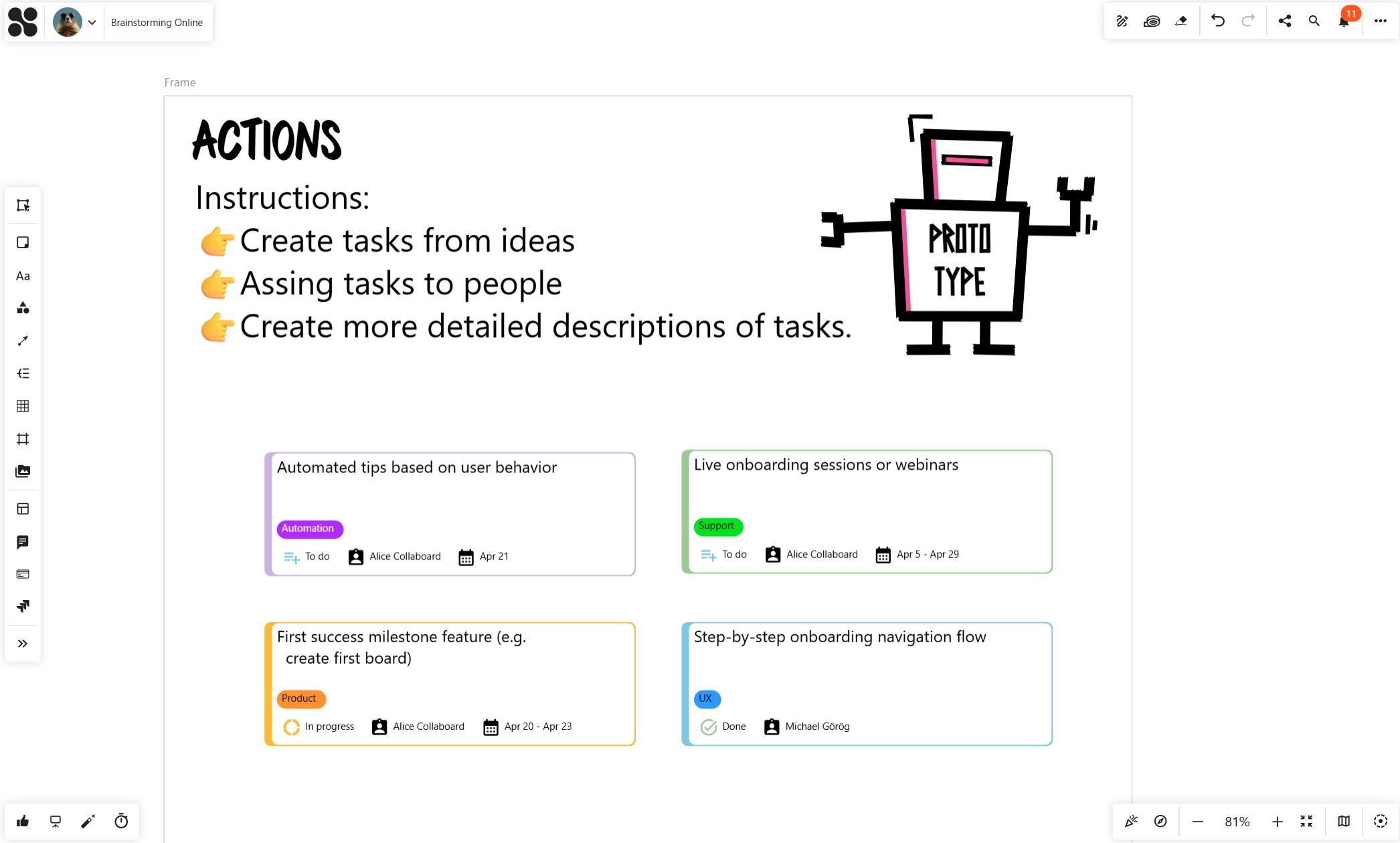
Selected ideas should be transformed into concrete tasks. Each task should include a clear description so that everyone understands what needs to be done.
Even more important is ownership. Every task must be assigned to a responsible person. Without clear ownership, execution is unlikely.
To keep things simple, tasks can be organized visually into stages such as “To Do,” “In Progress,” and “Done.” This creates transparency and makes progress visible to the entire team.
One of the biggest advantages of using an online whiteboard is that everything stays in one place. Ideas, decisions, and tasks are all connected, which avoids information loss and reduces the need to switch between tools.
Best Practices for Online Brainstorming
Effective brainstorming is not about complexity. It is about clarity and consistency.
A few principles can make a big difference.
Preparation should always be done in advance. Participants should immediately understand the goal and the process. During idea generation, it is important to avoid discussions and focus on collecting ideas. Prioritization should be structured and limited to the most relevant options. And finally, every session should end with clear next steps.
When these principles are applied consistently, brainstorming becomes a reliable and effective method. To check the step-by-step guide for online brainstorming, have a look at this video: Online Brainstorming: Best Practices with an Online Whiteboard
On This Page

Start for free with Collaboard
Create your first online whiteboard, invite others and start collaborating visually.
You can use Collaboard for free and upgrade later whenever your needs grow.
*No credit card required
Michael Görög
Co-Founder Collaboard
Michael Görög is co-founder of Collaboard and is passionate about digital collaboration, visual work and the future of teamwork. He regularly shares practical insights on online whiteboards, collaboration methods, AI and new ways of turning ideas into action.

.avif)
Frequently asked questions
Any questions? We are here to help.
Online brainstorming is a structured method for generating, sharing, and organizing ideas collaboratively using digital tools such as online whiteboards. It enables teams to contribute in real time, regardless of location, and helps capture ideas visually so they can be easily structured, discussed, and further developed.
An effective brainstorming session follows a clear structure, starting with proper preparation and a well-defined question. During the session, ideas are first generated without discussion, then organized and clustered, prioritized through voting, and finally turned into actionable tasks with clear ownership and next steps.
An online whiteboard provides a visual and interactive space where teams can collaborate in real time. It helps structure ideas, makes patterns visible, and allows participants to actively contribute. In addition, it enables a seamless transition from idea generation to prioritization and execution, all within one shared workspace.
Effective online brainstorming techniques include silent brainstorming, using one idea per sticky note, clustering ideas with tags, and applying voting methods to prioritize results. The key is to separate idea generation from evaluation and follow a structured process.
To turn ideas into action, selected ideas should be converted into clearly defined tasks with descriptions, assigned owners, and deadlines. Organizing tasks visually, for example in a “To Do, In Progress, Done” workflow, helps teams track progress and ensure execution.
Effective facilitation requires clear preparation, simple instructions, and a structured flow. The facilitator should guide participants through defined phases—idea generation, clustering, prioritization, and action planning.
Subscribe to the newsletter
Stay up to date with the latest tips and news on collaboration.
Start your next whiteboard now
Get a free trial of Collaboard with up to 3 boards and five people per session. All key features are available for you to try out.

