
Connect AI With Your Online Whiteboard Using the Collaboard MCP Server
The Collaboard MCP Server connects AI tools with your online whiteboard. Create editable boards, summarize transcripts, prepare workshops and analyze existing whiteboard content using natural language prompts.


.png)

AI is powerful. But too often, the result stays trapped in a chat.
Many teams already use AI to summarize meetings, generate ideas, write texts, prepare presentations or structure complex information. The results are often useful, but they usually remain inside the AI chat.
From there, the manual work starts.
You copy and paste text into another tool. You rebuild structures in a presentation. You recreate sticky notes on a whiteboard. You turn a static AI output into something your team can actually work with.
This costs time and creates friction.
The Collaboard MCP Server helps solve exactly this problem. It connects AI tools with Collaboard, so AI-generated content can become part of your visual workspace directly.
Instead of ending with a text answer in a chat, you can start with an editable whiteboard in Collaboard.
What is the Collaboard MCP Server?
The Collaboard MCP Server connects Collaboard with AI tools through the Model Context Protocol, short MCP.
MCP is an open standard that allows AI systems to connect with external tools, data sources and applications. A simple way to think about it is as a standardized bridge between an AI tool and a work environment.
With the Collaboard MCP Server, compatible AI tools can interact with Collaboard. Depending on the AI tool, configuration and permissions, AI can create new boards, add editable content, read board content, summarize information and help you search across your whiteboards.
In simple terms:
The Collaboard MCP Server allows AI and your online whiteboard to work together.
This is important because an online whiteboard is not just a place to display information. It is a collaborative workspace where teams brainstorm, plan, discuss, prioritize and make decisions.
Why connect AI with an online whiteboard?
AI is excellent at creating structure from unstructured information. Online whiteboards are excellent at making that structure visible and collaborative.
Together, they create a very practical workflow.
You can take a long transcript, a set of notes or a rough idea and turn it into a visual board that your team can continue working on. The AI creates a first version. You refine it, adapt it and use it with others.
This is especially useful when you want to:
- prepare a workshop
- summarize a meeting
- create a product roadmap
- turn a transcript into a visual overview
- generate sticky notes from structured or unstructured text
- analyze an existing whiteboard
- create a management summary after a workshop
- find relevant boards or board content using natural language
The goal is not to replace human facilitation, creativity or judgment.
The goal is to remove repetitive preparation work, so people can focus more on the actual collaboration.
What can the Collaboard MCP Server do?
The Collaboard MCP Server connects AI tools with Collaboard and enables them to create, structure, read and analyze whiteboard content. The current beta already supports several practical capabilities that help teams move faster from an idea, transcript or discussion to an editable visual workspace.
Practical use cases for AI-powered whiteboards
The Collaboard MCP Server can support a wide range of everyday workflows. Here are some practical examples.
From transcript to visual board
A common use case is turning a transcript into a visual summary.
This can be a transcript from a meeting, webinar, product update, training session or customer interview. Instead of reading through the full text, you can ask AI to create a structured Collaboard board.
The board can include:
- main topics
- key takeaways
- important quotes or insights
- decisions
- tasks
- open questions
- follow-up actions
This workflow is especially useful when information needs to be shared with a team, discussed further or turned into action. Learn more on how AI turns meeting transcripts into visual workspaces.
From meeting notes to management overview
Another useful scenario is creating a management overview from meeting notes.
After a strategy meeting, product discussion or project review, AI can help create a visual summary with sections such as:
- executive summary
- strategic positioning
- commercial impact
- risks
- roadmap
- next steps
This helps teams communicate complex discussions in a clear and structured way.
Instead of sending a long document, you can create a visual overview that is easier to scan, discuss and refine.
From retrospective discussion to retrospective board
Retrospectives are another strong use case.
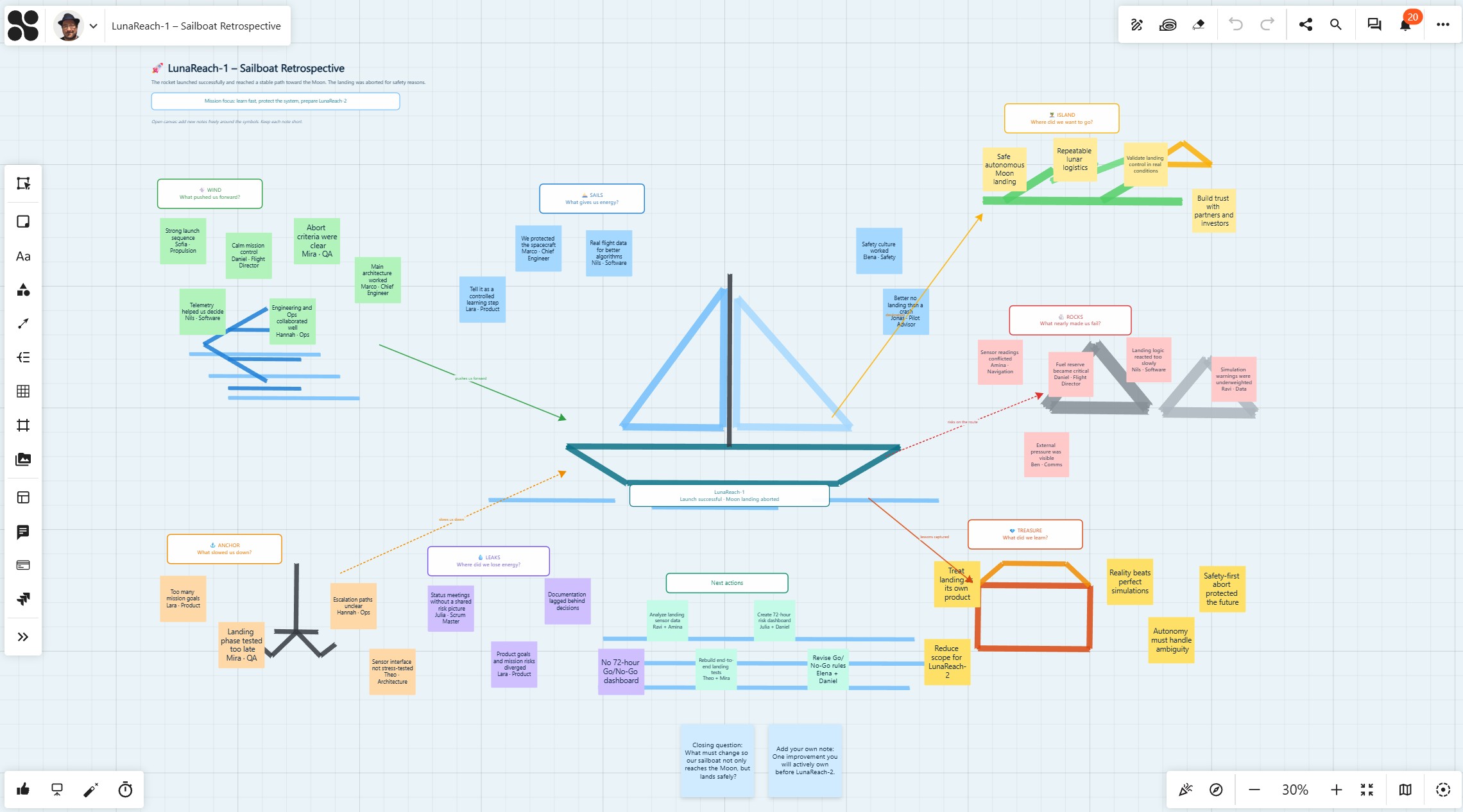
A team can discuss what went well, what slowed them down, which risks they see and which actions they want to take next. Based on notes or a transcript, AI can create a first version of a retrospective board.
For example, for a sailboat retrospective, the board could include:
- the goal or island
- wind that helped the team move forward
- anchors that slowed the team down
- rocks or risks ahead
- actions for the next phase
The team can then review, adjust and prioritize the content together in Collaboard.
From rough idea to workshop structure
Sometimes you do not have a finished concept yet. You only have a rough idea for a workshop, meeting or project session.
In this case, you can use AI to create the first structure.
For example:
“Create a workshop board for identifying improvement areas in our customer onboarding process. Include sections for current challenges, root causes, ideas, priorities and next steps.”
This gives you a structured starting point that you can adapt before inviting participants.
From sticky notes to creative visual formats
Not every use case needs to be formal.
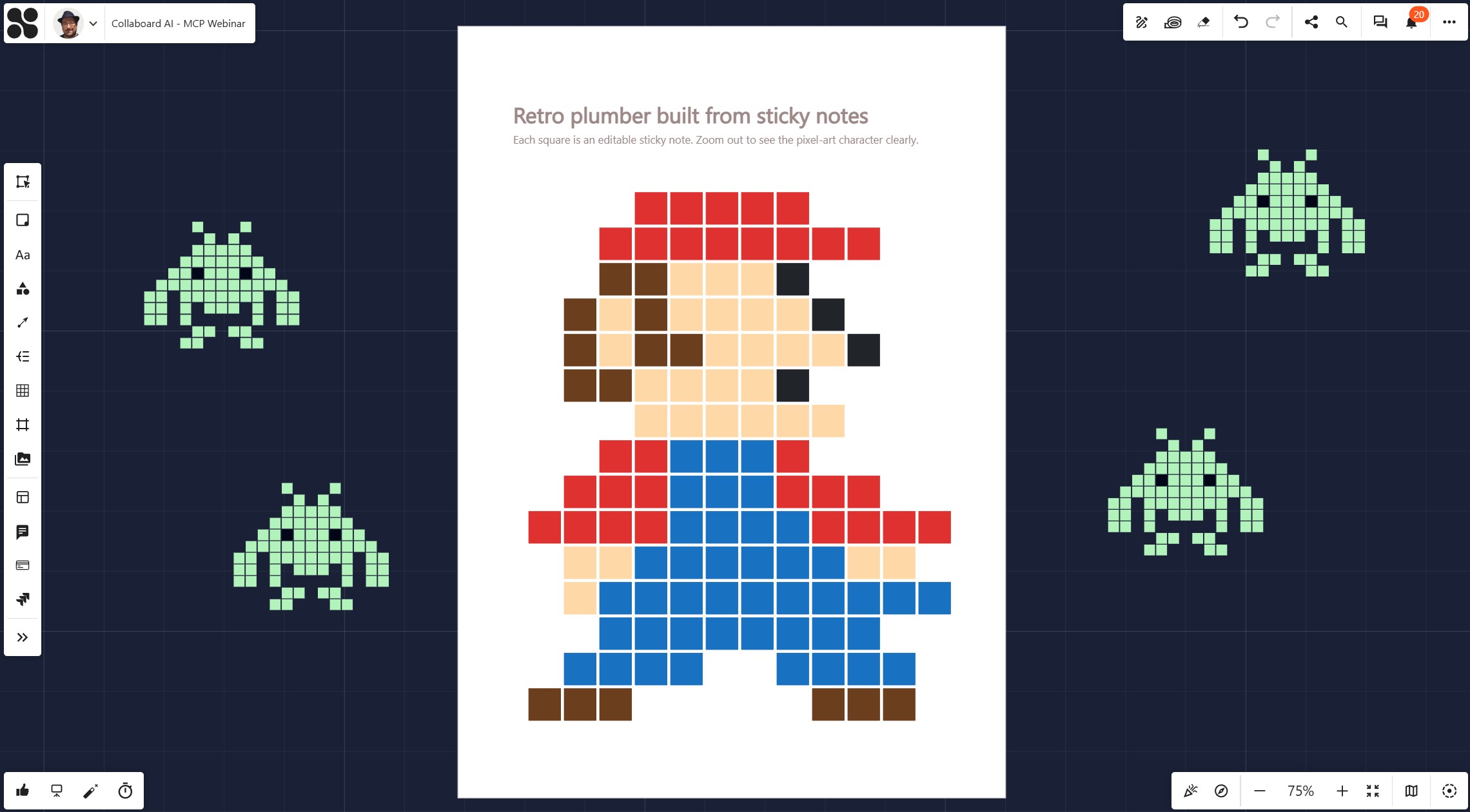
Because the MCP Server can create many board elements quickly, it can also be used for creative formats. For example, sticky notes can act like pixels to create simple visual artwork, icons or playful workshop warm-ups.
This is fun, but it also demonstrates something important: AI can place and structure many editable elements quickly.
The same capability can be used for visual maps, frameworks, workshop layouts, planning boards and dashboards.
Prompting tips for better AI-generated whiteboards
The quality of an AI-generated whiteboard depends heavily on the prompt.
When you ask AI to write a text, the prompt defines the content. When you ask AI to create a whiteboard, the prompt also needs to define structure, space, layout and audience.
The following tips help you get better results when using AI with the Collaboard MCP Server.
A good prompt does not need to be long. But it should be specific enough to guide both the content and the layout of the board.
For example:
“Create a workshop board in Collaboard for a 90-minute strategy session. The target audience is a product team. Use five clearly separated sections: Goals, Challenges, Ideas, Prioritization and Next Steps. Arrange the board from left to right. Leave enough empty space in each section for participants to add sticky notes. Use short sticky notes with a maximum of two lines.”
This kind of prompt gives the AI enough context to create a useful first version.
How to set up the Collaboard MCP Server
The exact setup depends on the AI tool and the Collaboard environment you use. But the basic principle is simple.
There are two sides to the setup:
- the AI tool
- Collaboard
In the AI tool, you need the option to create an MCP connection. You enter the Collaboard MCP endpoint URL. This URL depends on your Collaboard environment. For cloud environments, the relevant information is available in the Collaboard help documentation. For self-hosted or on-premises environments, your IT team or system administrator can provide the correct endpoint.
The AI tool then creates a callback or redirect URL.
In Collaboard, you create an OAuth client. You add the redirect URL from the AI tool and generate the required client information, such as a client ID and, depending on the AI tool, a client secret.
After that, you return to the AI tool, enter the required information and sign in to Collaboard.
Once the connection is complete, the AI tool can interact with Collaboard based on the permissions and configuration. Here you find a step-by-step guide on how to connect AI tools with Collaboard.
Data privacy, control and responsible AI usage
Connecting AI to a whiteboard environment is powerful. It also requires a clear decision about data.
Creating a new empty board with AI is different from allowing an AI tool to read existing board content. Organizations should define which AI tools are approved, which data may be processed and who is allowed to create connections.
This is especially important for companies with strict requirements around data protection, compliance, data sovereignty or internal governance.
Collaboard is designed for organizations that care about secure visual collaboration. Depending on your setup, Collaboard can be used in cloud, private cloud, self-hosted or on-premises environments.
The MCP Server can also be connected to different AI systems, including enterprise-approved AI tools or local AI models, if they support the required connection.
The key principle is:
Use AI where it creates value, but stay in control of your data and your tools.
What to know about the beta version
The Collaboard MCP Server is currently available in beta.
This means the current capabilities are already useful, but the functionality is still evolving. Feedback from users is especially important in this phase.
The beta already supports many important workflows, including creating boards, adding editable content, summarizing board content and searching for information.
At the same time, not every Collaboard element is supported yet. For example, the current beta focuses on elements such as sticky notes, text, shapes, lines, emojis and simple drawings. Other elements, such as tables or direct image placement, may require different workflows.
This is normal for a beta phase. The goal is to learn which use cases create the most value and which capabilities should be developed next.
The real value: faster first versions
The Collaboard MCP Server does not magically create the perfect board every time.
And that should not be the expectation.
The real value is that AI can create a useful first version very quickly. From there, you can refine the board, adjust the layout, shorten text, lock elements, add facilitation instructions, create quick links and prepare the board for real collaboration.
This makes the workflow practical.
- You do not start from an empty board. You start from a structured draft.
- You do not spend time rebuilding basic layouts. You spend time improving the experience.
- You do not keep AI output inside a chat. You bring it into the workspace where your team can use it.
On This Page

Start for free with Collaboard
Create your first online whiteboard, invite others and start collaborating visually.
You can use Collaboard for free and upgrade later whenever your needs grow.
*No credit card required
Michael Görög
Co-Founder Collaboard
Michael Görög is co-founder of Collaboard and is passionate about digital collaboration, visual work and the future of teamwork. He regularly shares practical insights on online whiteboards, collaboration methods, AI and new ways of turning ideas into action.

.avif)
Frequently asked questions
Any questions? We are here to help.
AI is useful for generating and structuring information. An online whiteboard makes that information visual, editable and collaborative. Together, they help teams move faster from ideas or transcripts to usable workspaces.
Yes. The Collaboard MCP Server can create editable elements such as sticky notes, text objects, emojis, shapes, lines and simple drawing elements.
Yes, if the AI tool has the required access and permissions. You can ask AI to summarize board content, extract key points, list decisions or create follow-up actions.
Security depends on the configuration, the AI tool used and the permissions granted. Organizations should only connect approved AI tools and define clear rules for which data may be processed. Collaboard supports secure deployment options, including self-hosted and on-premises environments.
Subscribe to the newsletter
Stay up to date with the latest tips and news on collaboration.
Start your next whiteboard now
Get a free trial of Collaboard with up to 3 boards and five people per session. All key features are available for you to try out.

