
Breakout Groups Template
Split a large group into smaller teams and give each one its own workspace on the board. Afterwards, everyone can see all results side by side.
Free to start · Swiss-made · GDPR compliant

Organizing breakout groups in a workshop
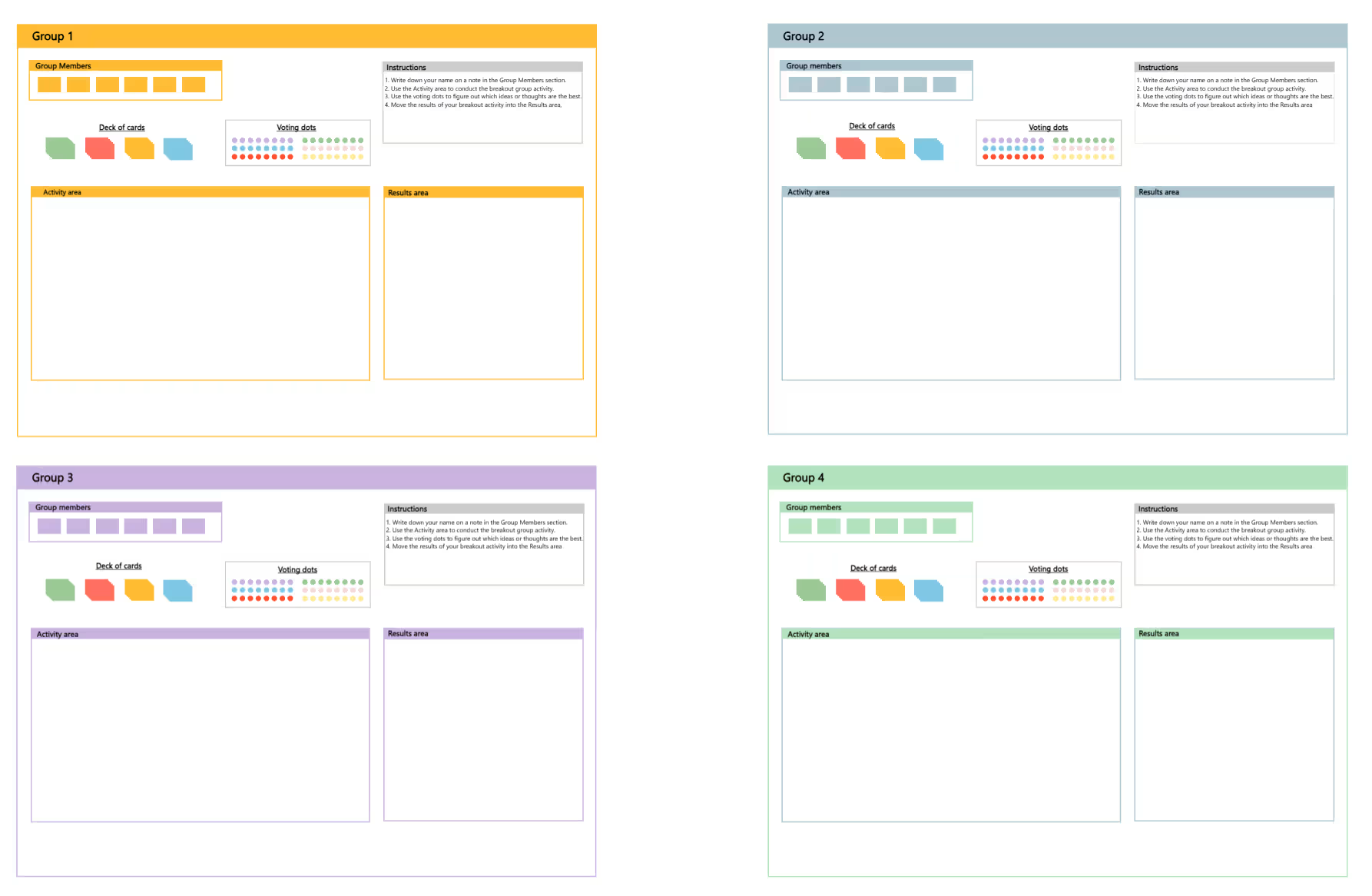
The Collaboard template has four identical group areas, each in its own color. Every area includes a field for the group members, short instructions, a deck of colored notes, voting dots in six colors, a large activity area and a results area. All groups work in parallel on the same board, and the facilitator can see them at once.
Prepare the task
Define the task for each group and write it into the activity areas, or give all groups the same question.
Form the groups
Split participants into up to four groups. Everyone writes their name on a note in the Group members field.
Work in the activity area
Each group works on its task with the deck of cards. Agree on a fixed time, for example 15 minutes.
Vote within the group
Each group uses the voting dots to find its best ideas or most important points.
Move the results
Groups move their top results into the Results area, so they're easy to present.
Share in plenary
Bring everyone back together. Each group presents its results area in a few minutes.
What are breakout groups?
Breakout groups split a larger group into small teams that work on a task in parallel and then share their results. Everyone gets more speaking time, quieter participants contribute more, and large workshops become more productive.
What each group area contains
The examples follow one illustrative scenario: a workshop with 20 people on improving customer onboarding, split into four groups.
- Group members Six notes for the names of the group. Example: the five people working on the welcome email.
- Instructions Four short steps, so each group can start on its own.
- Deck of cards and voting dots Notes in four colors for ideas, and dots in six colors to vote on the best ones.
- Activity area The space where the group works on its task. Example: collecting ideas for the first week as a new customer.
- Results area The best results, ready to present. Example: the three ideas the group voted highest.
Breakout groups work well with a clear method for each group, for example a brainstorming or the Six Thinking Hats.
When to split a group into breakouts
- Large workshops Give everyone a chance to contribute, even with 20 or more participants.
- Parallel topics Let each group work on a different aspect of a problem.
- Hybrid and online sessions Combine the board with breakout rooms in your video tool.
- Training Let small groups practice a method before discussing it together.
Facilitating breakout groups smoothly
- Give a clear task Each group needs a concrete question and a time limit.
- Name a presenter Agree in each group who presents the results, to save time later.
- Keep results short Three to five points in the results area are easier to compare than a full board.
- Visit the groups As the facilitator, look into each area from time to time and help where a group gets stuck.
Why Collaboard
A Swiss-made online whiteboard for teams that care where their data lives.
Your data stays in Europe
Choose hosting in Switzerland, Germany or the EU, fully GDPR compliant. Or run Collaboard on your own servers.
Invite anyone with a link
Guests join your board for free, right in the browser. Nothing to install, no extra licenses for participants.
Made in Switzerland, with real support
Collaboard is developed in Switzerland. When you need help, you talk to people who know the product.
Frequently asked questions
Is the breakout groups template free?
Yes, the breakout groups template is free to use with a Collaboard account. The free plan includes up to 3 boards and five people per session.
How many people should be in a breakout group?
A breakout group usually has three to six people, so everyone can contribute.
Can I use breakout groups online?
Yes, breakout groups work online when you combine the board with breakout rooms in your video tool, and each group works in its own area.
Can the facilitator see all breakout groups?
Yes, all breakout group areas are on the same board, so the facilitator can follow every group's progress.
How do I share the results of breakout groups?
The results of all breakout groups are already on one board. Walk through them together or export the board.
Start your next whiteboard now
Get a free trial of Collaboard with up to 3 boards and five people per session. All key features are available for you to try out.

