
Start Stop Continue Template
A simple retrospective format with three questions: what should we start, stop and continue doing? Collect feedback from the whole team and turn it into concrete improvements.
Free to start · Swiss-made · GDPR compliant
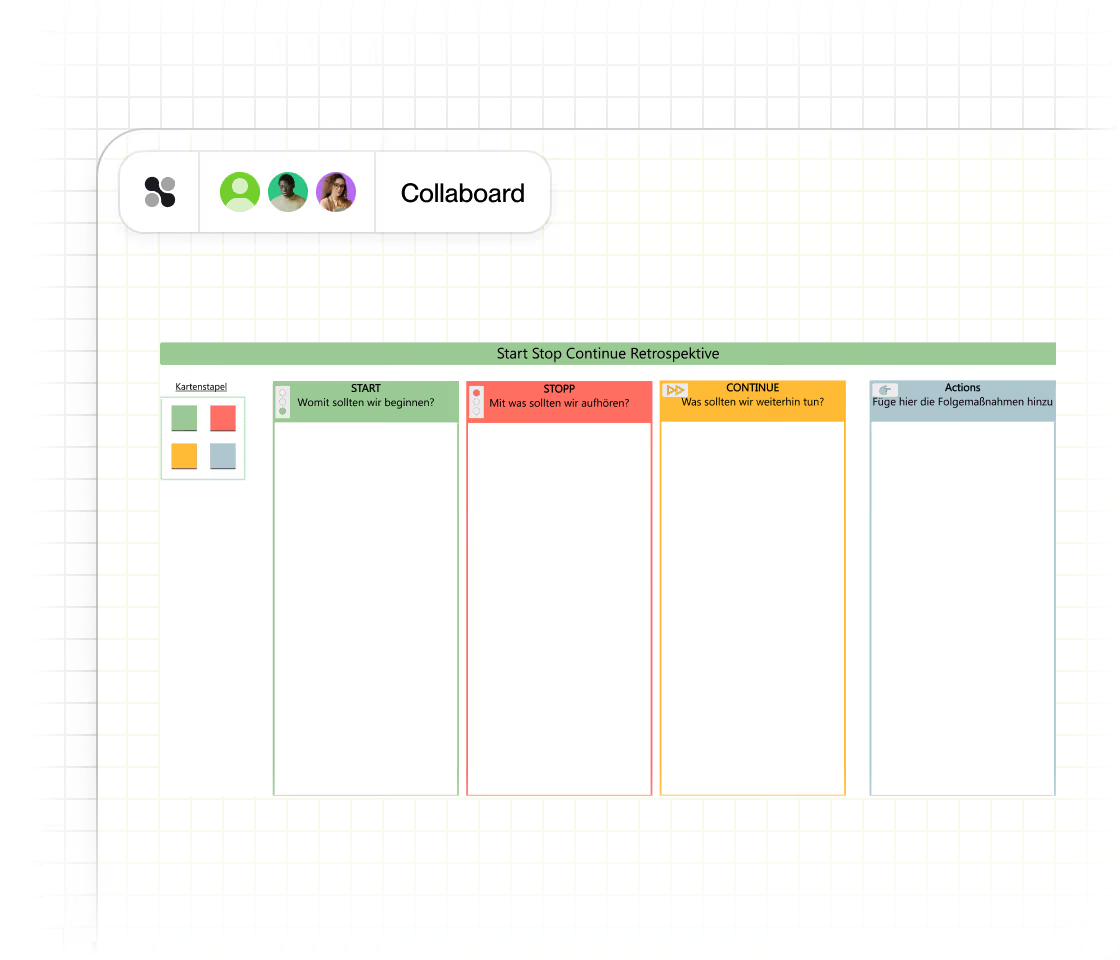
A Start Stop Continue retro from frame to actions
The Collaboard template has four colored columns: green for Start, red for Stop, yellow for Continue and blue for Actions. Each column has its own deck of sticky notes, and the rule at the top keeps the session focused: one card per idea, write on your own first, then cluster and discuss. These steps fit into about 15 to 20 minutes.

Set the frame
Agree on the period you're looking back on, such as the last sprint, and set a timer for the writing phase.
Write on your own
Everyone takes notes from the decks and writes one idea per card in Start, Stop and Continue, without discussing yet.
Read and cluster
Go through each column together, group similar cards and clarify anything that is unclear.
Vote
Use dot voting to find the two or three topics that matter most to the team.
Define actions
Turn the top topics into concrete actions in the Actions column, each with an owner and a date.
Check next time
Open the next retrospective by reviewing the actions. That's what turns feedback into real change.
What is Start Stop Continue?
Start Stop Continue is a simple retrospective format, also known as Start Stop Keep. The team looks back on a sprint, a project or a period of work and answers three questions: what should we start, stop and continue doing? Because the questions point straight at behavior, the format leads quickly to concrete changes.
The four columns of the template
- Start: What should we start doing? New ideas, practices or habits that could help the team work more effectively. Example: a short check-in at the start of each planning meeting.
- Stop: What should we stop doing? Things that slow the team down, drain energy or add no value. Example: status updates by email that nobody reads.
- Continue: What should we continue doing? Practices that work well today and contribute to success. Example: pairing on complex tasks.
- Actions: What will we actually do? The concrete next steps that come out of the discussion, each with an owner.
If your team wants more nuance than start or stop, the Starfish Retrospective adds More Of and Less Of.
When three questions are enough
- Short sprint retros A quick format when the team has only 20 minutes at the end of a sprint.
- Teams new to retrospectives Three simple questions that everyone understands right away.
- After a project phase Decide what to carry into the next phase and what to leave behind.
- Personal reflection Review your own work habits on your own board.
Keeping Stop about behavior, not people
- Keep Stop about behavior Write status meetings without an agenda, not names. Criticism of people blocks open feedback.
- Watch an empty Continue column If nobody adds anything, ask explicitly what worked. Teams lose good habits they never name.
- Limit the actions Two or three actions per retro are realistic. Ten actions usually means none get done.
- Change the format now and then If the answers become repetitive, switch to a visual format like the Sailboat Retrospective for one round.
Why Collaboard
A Swiss-made online whiteboard for teams that care where their data lives.
Your data stays in Europe
Choose hosting in Switzerland, Germany or the EU, fully GDPR compliant. Or run Collaboard on your own servers.
Invite anyone with a link
Guests join your board for free, right in the browser. Nothing to install, no extra licenses for participants.
Made in Switzerland, with real support
Collaboard is developed in Switzerland. When you need help, you talk to people who know the product.
Frequently asked questions
Is the Start Stop Continue template free?
Yes, the Start Stop Continue template is free to use with a Collaboard account. The free plan includes up to 3 boards and five people per session.
How long does a Start Stop Continue retrospective take?
A Start Stop Continue retrospective takes about 15 to 20 minutes with a small team, as suggested on the Collaboard board. Larger teams or longer discussions need 30 to 45 minutes.
What is the difference between Start Stop Continue and Starfish?
Start Stop Continue asks whether to start, stop or keep something. The Starfish Retrospective adds More Of and Less Of, so teams can also adjust how much they do something.
Why does the Start Stop Continue template have an Actions column?
The Actions column in the Start Stop Continue template makes sure the retrospective ends with concrete next steps, each with an owner, instead of just a list of feedback.
Can a remote team run a Start Stop Continue retrospective?
Yes, a remote team can run Start Stop Continue in Collaboard. Everyone writes on the same board at the same time, and the board stays available for the follow-up in the next retrospective.
Can I customize the Start Stop Continue template?
Yes, the Start Stop Continue template can be customized. Add sticky notes, images or extra columns such as More of and Less of to fit your team.
Start your next whiteboard now
Get a free trial of Collaboard with up to 3 boards and five people per session. All key features are available for you to try out.

